

Most people searching for a "charity tracker" end up stuck in one of two bad spots. Either they bounce between four different rating sites every time they give and remember nothing, or they rely on a single star rating and ignore everything underneath it. Both approaches fall apart the moment you're giving to more than a handful of organizations — or when a charity you already support shows up in the news for the wrong reasons.
The gap isn't information. There's plenty of public data on nonprofits. What's missing is a system that pulls it together, stays reasonably current without constant babysitting, and lets you compare organizations using your own criteria instead of someone else's weighted formula.
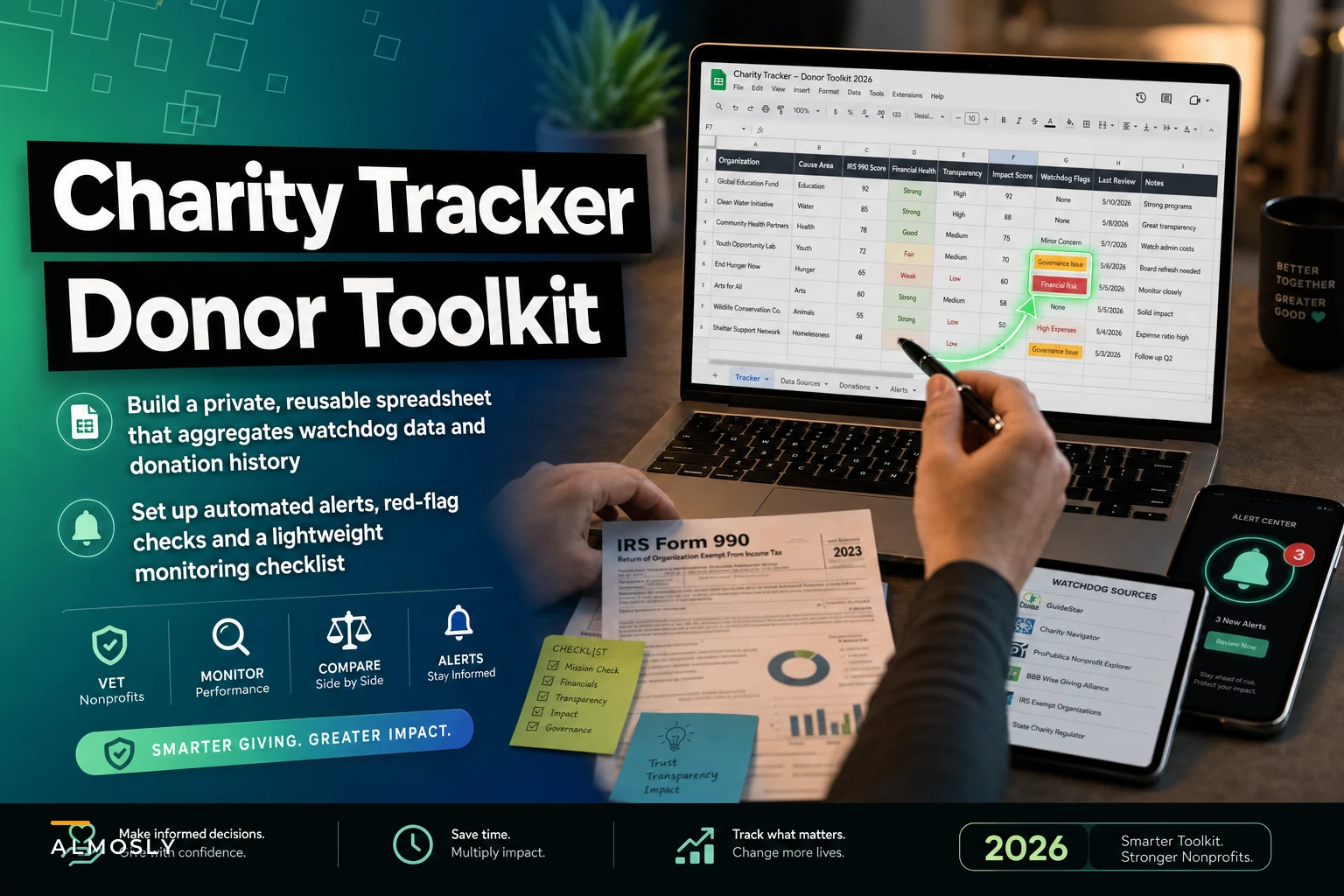
This is a build guide. By the end you'll have a reusable tracker in Google Sheets or Airtable, a short list of metrics and red flags worth recording, the public data sources that actually hold up, and a lightweight alert setup so the tracker tells you when something changes — instead of going stale in a tab you never reopen.
Why single rating sites quietly fail you
Charity rating platforms are useful, but each one optimizes for something a bit different. Charity Navigator leans heavily on financial ratios and accountability checklists. Candid (formerly GuideStar) mostly measures how much a nonprofit voluntarily discloses, not how well it actually performs. CharityWatch is pickier and grades on efficiency, but covers far fewer organizations. BBB Wise Giving Alliance checks against 20 accountability standards and returns a pass/fail rather than a nuanced score.
The practical problem: a charity can score well on one platform and be absent or mediocre on another. A small, effective local food bank might have no rating anywhere simply because it's under the revenue threshold that triggers coverage. If your mental model is "high score = good, no score = skip," you'll systematically overlook smaller organizations where your dollar often goes further.
A tracker you own fixes this by letting you record multiple signals and your own notes in one row. You stop outsourcing the judgment and start aggregating the inputs.
What to actually track (and what to ignore)
The temptation when building a tracker is to add 40 columns. Don't. The tracker you'll actually maintain is the one with maybe 12–15 fields, where each one earns its place by changing a decision.
Stop missing fundraising opportunities.
Almosly helps you plan, track, and optimize every campaign with ease.
- Centralized donor and volunteer management
- Automated engagement workflows
- Impact and fundraising analytics
No credit card required
| Field | What it tells you | Source |
|---|---|---|
| Legal name + EIN | Confirms you're looking at the right entity (names repeat; EINs don't) | IRS Tax Exempt Org Search |
| 501(c)(3) status active? | Whether your gift is deductible and the org is in good standing | IRS TEOS / Pub 78 |
| Program expense ratio | Rough share of spending going to mission vs overhead | Form 990, Part IX |
| Top exec compensation | Sanity check against org size (not a red flag by itself) | Form 990, Part VII |
| Months of operating reserve | Financial cushion; too thin or weirdly huge both warrant a look | 990 net assets / annual expenses |
| Watchdog ratings (2–3 sources) | Independent accountability signals | Charity Navigator, CharityWatch, BBB |
| Transparency seal | Whether they disclose voluntarily | Candid |
| Last 990 filing year | Stale filings = possible trouble or dormancy | ProPublica Nonprofit Explorer |
| Your total given + dates | Your own history, for taxes and renewal decisions | You |
| News flags | Lawsuits, leadership turnover, investigations | Google Alerts / news search |
| Notes / decision | Why you gave or passed, in your words | You |
A few things deliberately left off: elaborate "impact per dollar" numbers that aren't independently verified, social media follower counts, and the glossy content on the "our impact" page. Those are marketing outputs, not accountability inputs.
One field people consistently forget: last 990 filing year. An organization that hasn't filed in two or three years isn't automatically fraudulent, but it's the single cheapest early-warning signal you have. Nonprofits that lose their exempt status almost always go quiet on filings first.
Red flags worth a column of their own
Numbers rarely tell you a charity is bad. Patterns do. These are the things that, when they stack up, justify a pause before giving more.
-
A program expense ratio that swings wildly year to year — not a low number on its own, but 78% one year and 51% the next with no explanation.
-
Fundraising costs climbing faster than revenue across multiple filings.
-
Insider transactions disclosed on Schedule L (loans to officers, business with board members' companies). One can be fine. A pattern isn't.
-
Reserves that balloon while the org keeps running emergency appeals. Occasionally legitimate, often worth a question.
-
No independent audit for an organization well past the size where you'd expect one.
-
Board that's tiny or family-dominated, visible in 990 Part VII.
-
Repeated leadership turnover surfacing in news within a short window.
None of these is a verdict on its own. They're reasons to read more carefully or ask the organization directly before a larger gift. The tracker's job is to surface them so you're not relying on memory.
Building the tracker: a step‑by‑step process
The build itself takes about 30–45 minutes to set up and a couple of minutes per charity after that.
-
Create the base. New Google Sheet or Airtable base. One row per organization. Add the columns from the table above. In Airtable, make "Watchdog ratings" and "News flags" their own linked tables if you want history; in Sheets, keep it flat and use one row.
-
Add an EIN lookup column first. Before anything else, paste the EIN. Everything downstream keys off it. In Sheets you can build a hyperlink formula so clicking the EIN jumps straight to that org's ProPublica page:
=HYPERLINK("https://projects.propublica.org/nonprofits/organizations/"&A2, A2). -
Pull the baseline 990 data. Open ProPublica Nonprofit Explorer, search the EIN, and record three or four financial fields. ProPublica surfaces the key figures without making you read the whole PDF, though the full filings are there if you want them.
-
Add watchdog scores. Check Charity Navigator and one other source. Record the score and the date you checked — ratings change, and a score from two years ago is a different thing than one from last month.
-
Log your own giving. Total given, first gift date, last gift date. This column quietly becomes the most useful one at tax time and when you're deciding whether to renew.
-
Write the decision note. One or two sentences
why you gave, why you passed, what you'd want to see before giving more. Future-you will not remember this, and it's the field that turns a spreadsheet into actual judgment.
-
Set a review cadence. Add a "next review" date column. Annual is fine for most. Quarterly for anything you're giving four figures or more to.
Paste the EIN first so lookups and formulas resolve cleanly.
That's the whole build. Everything after this is keeping it current without babysitting it.
Keeping it current with lightweight automation
A tracker that goes stale is worse than no tracker, because it gives you false confidence. The fix is making the tracker tell you when something moves instead of you re-checking everything manually.
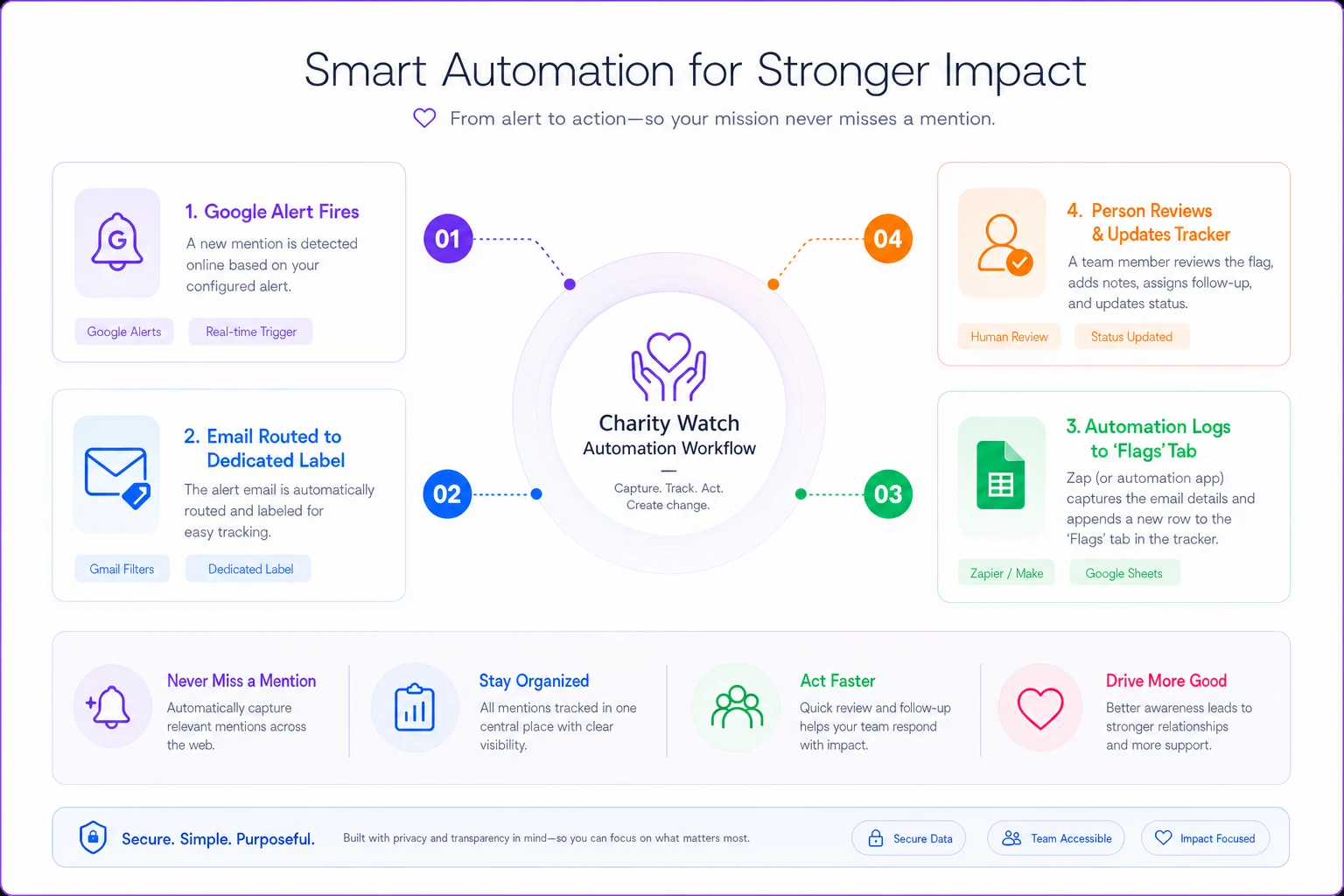
Google Alerts is the backbone. For each organization you care about, set an alert on the legal name plus a term like "Organization Name" lawsuit OR investigation OR resigns. Route alerts to a dedicated label or folder so they don't drown in your inbox. When one fires, you add a line to the News flags column and decide whether it matters.
RSS feeds work for the watchdogs that publish them and for news searches. You can pull results for an organization into an RSS reader and scan a handful of orgs in one view each week — faster than visiting ten sites individually.
Zapier or Make connects the pieces for anyone who doesn't want to copy-paste. A simple, reliable pattern: a new Google Alert email triggers a Zap that appends a row to a "flags to review" tab with the date, organization name, and headline link. You still make the call; the automation just captures the signal so nothing slips. Keep these boringly simple — one trigger, one action. The more branching logic you add, the more likely it breaks silently, and a monitoring tool you can't trust is pointless.
A realistic weekly rhythm: alerts and RSS land automatically during the week, you spend about ten minutes clearing the flags tab, and you touch the full tracker only when a "next review" date comes up. That's the difference between a system and a one-time research project.
A real scenario
Think of a household giving to around nine organizations — roughly $4k–$5k spread across them, mostly in December. Before building a tracker, the pattern was familiar: a flurry of year-end giving based on last year's habits and whichever appeal landed at the right moment, plus a scramble every April to find receipts.
After setting up a 12-column Google Sheet and Google Alerts on each org, two things changed in the first year. An alert surfaced that one organization's executive director had abruptly resigned amid a reported financial review — the household paused its usual gift and redirected it, something they'd have missed entirely under the old approach. And the giving history column revealed they'd been splitting small gifts across three similar organizations; consolidating into one pushed the amount past a threshold that unlocked a matching gift.
Nothing dramatic. No perfect numbers. Just a household that went from giving on autopilot to giving with roughly 20 minutes of quarterly maintenance behind each decision, and a tax season that took an afternoon instead of a weekend.
When this makes sense — and when it doesn't
Worth building if you give to more than three or four organizations, you make any gift large enough that you'd want to defend the decision, or you simply want your giving history in one place for taxes and renewals. The setup cost is small and the payoff compounds every year.
Probably overkill if you give to one or two organizations you know well and have a personal relationship with. A tracker won't tell you more than direct contact with the leadership already does.
Who should skip the automation layer: anyone giving to a small, stable set of local organizations that barely register in national news. Alerts on a neighborhood mutual aid group will mostly return noise. Keep the sheet, skip the Zaps.
One note on privacy: keep the tracker in your own account, don't log anyone else's giving without permission, and be mindful that a shared sheet of "who I give to and why" is personal data. The same discipline nonprofits apply when protecting supporter information — careful about what gets stored and who can see it — applies here too.
A quick starting checklist
Before you call the tracker done, confirm you've got:
-
[ ] One row per organization, keyed to EIN
-
[ ] IRS status confirmed (deductible + in good standing)
-
[ ] At least two independent watchdog signals, dated
-
[ ] Core 990 financials pulled from ProPublica
-
[ ] A red-flags column with the patterns above
-
[ ] Your own giving history and dates
-
[ ] A one-line decision note per org
-
[ ] A "next review" date on every row
-
[ ] Google Alerts set on each org you actively support
-
[ ] A review cadence you'll actually keep
A review cadence you'll actually keep
The point of owning the tracker
The value here isn't any single data source — it's that you stop giving on memory and marketing, and start giving on a small, repeatable set of signals you chose. Rating sites will keep disagreeing with each other, filings will keep lagging, and news will keep breaking after you've already given. A tracker you control doesn't eliminate those problems, but it catches them earlier and keeps your own history honest.
If you also sit on the nonprofit side of the table, this same lens is worth looking at from the other direction. Donors increasingly do exactly this kind of homework, which is why how an organization monitors and responds to its own charity ratings and protects recurring supporters during tough giving seasons matters more than it used to. The donors on the other end are building trackers of their own — and the quiet signals, like a stale filing or an unanswered question, are exactly what they're watching for, much the way careful operators watch for early warning signs before a supporter lapses.
Build the sheet. Set the alerts. Give it twenty minutes a quarter. That's enough to make your giving more confident and more defensible — without turning it into a research job you dread.
Ready to elevate your nonprofit impact?
Join 2,000+ nonprofits using Almosly to boost fundraising efficiency, deepen donor relationships, and scale philanthropic impact.