

The migration finishes clean. Data maps over, duplicates get merged, the vendor signs off, and everyone exhales. Then six weeks later the development director is exporting gift data into a spreadsheet again, the events coordinator is tracking RSVPs in her own Google Sheet, and half the major-gift moves are living in someone's Outlook notes. The CRM works fine. Nobody's using it the way anyone planned.
This is the gap almost nobody budgets for. Nonprofits spend months on the technical side — field mapping, deduplication, integrations — and then treat adoption as a training day. One two-hour session, a PDF cheat sheet, and the assumption that people will just fall in line. They don't. Adoption isn't a training problem, it's a behavioral one, and behavior doesn't change because you showed someone a screen once.
CRM adoption change management for a nonprofit is less about the software and more about redesigning the daily habits of every person who touches a donor record. That's harder, slower, and far more valuable than any migration checklist. If you already handled the technical side — and if you haven't, the donor-focused CRM migration checklist is worth reading first — this is the part that actually determines whether the investment pays off.
The real reason adoption stalls: everyone has a different "why"
Most rollout plans miss this. A CRM isn't one tool used one way. It's a shared system that a gift processor, a major-gift officer, an events person, a comms manager, and an ED all use for completely different reasons. When you train them all with the same generic overview, you accidentally tell every one of them that the system isn't really built for their job.
The gift processor cares about speed — how fast can I log a batch and reconcile it. The major-gift officer cares about context — can I see the last five touches before I walk into a meeting. The comms person cares about segmentation — can I pull a clean list without begging someone. The ED cares about the dashboard that tells her whether the quarter is on track. These are not the same needs, and a rollout that ignores that produces a predictable pattern: the people who don't see immediate value quietly route around the system.
The loudest resister usually isn't lazy or anti-tech. They're typically the person whose workflow got worse after the switch. The old system, however clunky, was tuned to how they actually worked over years. The new one asks them to do more clicks for a benefit they can't see yet. Until they personally feel a win, they'll keep the spreadsheet.
Stakeholder mapping before you touch training
Before you plan a single session, map who touches the CRM and what a win looks like for each of them. Not job titles — actual behaviors. A simple version looks like this:
A simple version looks like this:
| Role | What they do daily | What "adoption" means for them | Their biggest friction |
|---|---|---|---|
| Gift processing | Log gifts, reconcile deposits | Every gift entered same-day, coded correctly | Slow entry, unclear fund codes |
| Major-gift officer | Manage relationships, log moves | Moves + notes logged after every contact | "Feels like admin, not fundraising" |
| Comms / marketing | Build segments, send appeals | Pulls own lists without data help | Doesn't trust the data is clean |
| Events | Track RSVPs, attendance | Event data lives in CRM, not side sheets | Duplicate contacts, messy sign-ups |
| Executive director | Reviews pipeline, forecasts | Checks dashboard instead of asking for reports | Doesn't know reports exist |
Once you can see it laid out, the training plan writes itself differently. You stop teaching "the CRM" and start teaching each group the three things that make their week easier. That reframe alone changes adoption more than any feature demo.
Shadow-mode: run the new system quietly before it's mandatory
One of the most underused tactics in a nonprofit rollout is what I'd call shadow-mode. Instead of flipping a switch on go-live day and forcing everyone into the new CRM cold, you run it in parallel for a defined window — say three to four weeks — where a small group logs their real work in both the old and new system.
Stop missing fundraising opportunities.
Almosly helps you plan, track, and optimize every campaign with ease.
- Centralized donor and volunteer management
- Automated engagement workflows
- Impact and fundraising analytics
No credit card required
It sounds like extra work because it is. But it surfaces the stuff that kills adoption before it's everyone's problem. The events coordinator discovers that recurring attendees create duplicate contacts. The gift processor finds that a fund code from the old system didn't map cleanly. Better to find these with two people during shadow-mode than with your whole team during year-end giving.
Shadow-mode also does something subtle for buy-in. The people running it become your internal experts and advocates. When the full team goes live, there's already someone in the next cubicle who's used it for a month and can answer the "wait, where do I put this" questions. That peer support matters more than any help desk ticket.
A practical way to structure the calendar:
-
Week 1 Two to three volunteers log a slice of real work in both systems. Daily 10-minute check-in on what broke.
-
Week 2 Fix the top issues found. Expand shadow-mode to one full team (say, gift processing).
-
Week 3 Add a second team. Start documenting the actual workflows people use, not the ones the vendor demoed.
-
Week 4 Review adoption friction. Decide go-live date based on what you saw, not a date picked before you knew anything.
The mistake here is treating shadow-mode as a formality and rushing it in a week. If nobody found any problems, you didn't run it seriously.
Training sprints beat training days
A single big training session is designed to fail. People absorb maybe a fraction of it, then return to a full inbox and forget most of what they saw. Two weeks later they're guessing.
Short sprints work far better. Instead of one three-hour marathon, run a series of 30-to-45-minute sessions spread over a few weeks, each tied to one concrete task and one visible payoff. Session one for major-gift officers isn't "here's the CRM" — it's "here's how to see a donor's full history in ten seconds before your meeting." That's it. One skill, one immediate win, done.
Tie every sprint to a quick-win dashboard
This is where behavior actually sticks. Each training sprint should be paired with a simple dashboard that shows the person the value of what they just learned. Teach gift processors to code gifts correctly, then show them a reconciliation view that's suddenly clean. Teach major-gift officers to log moves, then show them a pipeline view that reflects their real work.
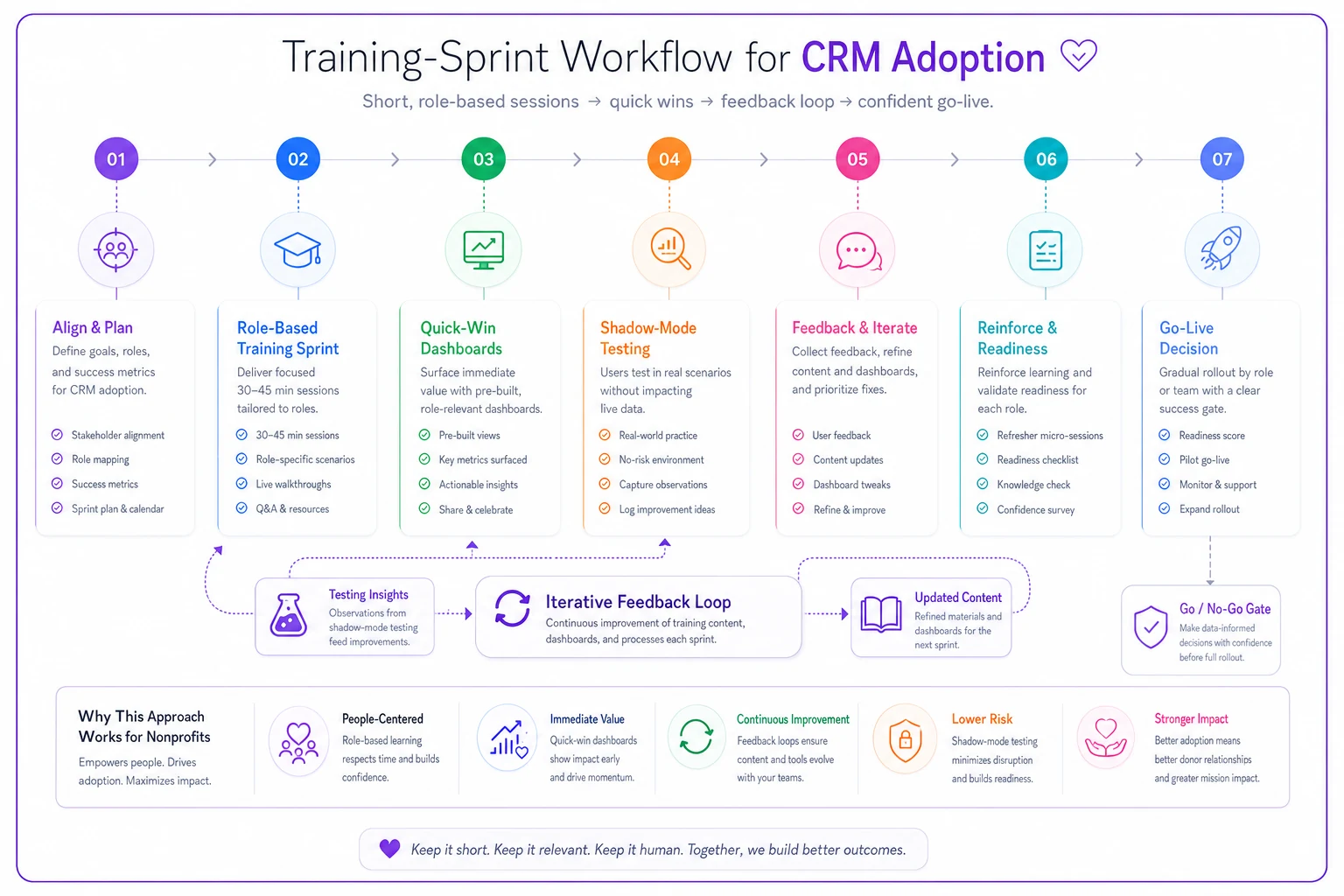
A simple visual to guide who needs which sprint and when.
Run sprints just before people will apply the skill so they can practice immediately.
The dashboard is the feedback loop. Without it, people are entering data into a black hole and getting nothing back — which is exactly why the spreadsheet feels more satisfying. A spreadsheet gives you an instant, visible result. Your CRM needs to do the same, or you're fighting human nature. When someone can see that their five minutes of logging turned into a report the ED actually looks at, the behavior reinforces itself.
Adoption KPIs: measure behavior, not logins
Most teams measure adoption with the laziest possible metric — did people log in. Logging in means nothing. Someone can log in daily and still do all their real work in a side sheet.
-
Same-day gift entry rate — what percentage of gifts are logged within 24 hours. If this is low, reconciliation and reporting are already unreliable.
-
Moves logged per officer per week — are relationship managers actually recording contacts, or is the pipeline fiction.
-
Reports pulled directly vs. requested — how often does the ED or comms person pull their own data instead of asking someone to build it. Strong signal the system is trusted.
-
Records edited outside of imports — are people actively working in the CRM or just letting integrations dump data in.
-
Side-system count — how many rogue spreadsheets still exist. You find this by asking, honestly, in a no-blame way.
Track a handful of these monthly for the first six months. The pattern you're watching for isn't a single good number — it's a trend line moving the right direction. If same-day entry climbs from around 40% to 70% over a quarter, that's real adoption taking hold, even if it's not perfect.
Role-level adoption scorecards
Instead of one org-wide adoption number, break it down by role. A team average hides the truth — you might have gift processing fully bought in while major gifts is quietly ignoring the whole thing, and the blended number looks fine.
A role-level scorecard is just a simple monthly view: for each role, the two or three KPIs that matter most to them, plus a trend arrow. It shows you exactly where adoption is breaking so you can target support instead of retraining everyone. And it creates gentle accountability — when a team sees its own numbers next to another team's, the conversation shifts from "the software is annoying" to "what do we need to fix here."
The one caution: don't turn scorecards into a punishment tool. The moment people feel the numbers are being used against them, they'll game the metric — logging junk moves to hit a count — and you've made your data worse. Frame it as "where do we need to invest support," not "who's failing."
A real scenario: mid-sized arts nonprofit
An arts organization with a team of nine switched CRMs after outgrowing a basic database. The migration itself went smoothly. Three months later, adoption was a mess — gift entry was lagging by a week or more, the two major-gift officers had barely logged anything, and the comms manager was still exporting to Excel for every appeal because she didn't trust the segments.
They stopped trying to fix it with more all-hands trainings. Instead they mapped roles, ran a three-week shadow-mode with the gift processor and one officer, and rebuilt training as short weekly sprints tied to dashboards each person actually cared about. Same-day gift entry went from roughly 35% to around 80% over about two months. The major-gift pipeline, which had been mostly empty in the system, started reflecting real activity — logged moves went from a handful a month to a steady rhythm. The comms manager pulled her own list for the year-end appeal for the first time.
Nothing about the software changed. The behavioral scaffolding around it did.
When this level of effort makes sense — and when it doesn't
When it's worth it: You have five or more people touching donor data, multiple roles with different needs, or a history of side spreadsheets. Any team that's already been burned by a failed or half-adopted system needs the full behavioral approach, not a lighter version.
When it's overkill: A two-person shop where both people already live in the CRM daily doesn't need role-level scorecards and shadow-mode. You'd spend more time on the process than the process saves. Keep it proportional — a quick check-in and a shared dashboard is plenty.
Who should NOT skip it: Organizations mid-growth, where you're hiring and the next few people will inherit whatever habits are set now. Bad adoption habits calcify fast. The gift processor who trains the next gift processor on "here's my spreadsheet trick" is how a system quietly dies over two years.
What changes as you grow
At a small scale, adoption is mostly about individual habits. As you add staff, it becomes a coordination problem. New hires need onboarding that assumes the CRM is the source of truth, not something to work around. Handoffs between roles — the events person passing a new contact to gift processing, the officer passing a stewardship task to comms — only work if everyone's data is in the same place and current.
Every person who routes around the CRM doesn't just create their own gap; they break the handoffs for everyone downstream. Modern CRM platforms with built-in automation help here — routing tasks, flagging stale records, nudging when a move hasn't been logged — but the automation only works on data people actually enter. The behavioral foundation has to come first. The tooling amplifies good habits; it can't manufacture them.
The takeaway that actually matters
Rollouts don't fail because the software is bad. They fail because someone treated a behavior change like an IT project. The organizations that get real, lasting adoption are the ones that map who does what, prove value to each role before demanding compliance, teach in small doses tied to visible wins, and measure the behaviors that matter instead of vanity logins.
Do that work, and the CRM stops being the thing people avoid and starts being the thing they'd complain about losing. That's the actual finish line — not go-live day, but the quiet moment months later when nobody remembers how they ever ran the place on spreadsheets.
Ready to elevate your nonprofit impact?
Join 2,000+ nonprofits using Almosly to boost fundraising efficiency, deepen donor relationships, and scale philanthropic impact.