

Nobody sends you an alert when a monthly donor's Visa expires. There's no bounced email, no failed-payment webhook, nothing dramatic. The card just stops working on the 1st of whatever month it hits its expiration date. And by the time your recurring-billing report flags it as "failed," you're already in cleanup mode — chasing a donor who's mentally moved on, competing with an inbox full of other charity asks.
Most teams lump this in with failed payments generally. That's the wrong framing. Expired cards are the one category of payment failure you can see coming months in advance, and almost nobody builds a workflow around that. A card update workflow nonprofit teams actually need isn't a recovery process — it's a pre-expiry process. You update the card before it ever fails, so recovery never has to happen.
This post is narrow on purpose. It's not about dunning, retries, or win-back sequences. It's about the 60/30/7-day window before a card dies, and how a small team can run a standards-based cadence that quietly keeps money flowing.
Why expired cards are a different animal than declined ones
A declined card is a reaction. Something happened — insufficient funds, a fraud hold, a bank rule — and you respond after the fact. An expired card is a scheduled event. The processor knows the expiration date. Your CRM stores it (or should). You have the data to act weeks ahead, and yet most nonprofits sit on it.
The pattern that comes up constantly: a gift processor stores cardexpmonth and cardexpyear on the payment token, but the CRM either doesn't sync those fields or nobody ever queries them. The expiration date exists in the system as dead data. Technically captured, operationally invisible.
The second reason this slips is psychological. Failed-payment recovery feels urgent, so teams build sequences around it. Pre-expiry outreach feels optional because nothing's broken yet. But "nothing's broken yet" is exactly the window where donor goodwill is highest and the ask is easiest. Asking someone to update a card that's about to expire is a two-second favor. Asking them to re-enter payment info after a failed charge feels, to the donor, like a problem — and problems trigger cancellation reconsideration.
If you want the after-the-failure side of this, we covered it separately in recovering failed recurring donations without losing supporters. This article is the upstream version — the goal is to make that recovery workflow fire far less often.
The standards-based cadence: 60 / 30 / 7
You don't need a complicated system. Three touchpoints, spaced by the amount of runway the donor has left, each calibrated in tone and channel. The logic behind the spacing:
Stop missing fundraising opportunities.
Almosly helps you plan, track, and optimize every campaign with ease.
- Centralized donor and volunteer management
- Automated engagement workflows
- Impact and fundraising analytics
No credit card required
-
60 days out is informational. No urgency, no pressure. You're letting a supporter know their card expires soon and giving them a frictionless way to update it early. This catches the organized people who'll handle it immediately.
-
30 days out is a gentle reminder for everyone who ignored the first one — which is most of them. Slightly more direct, still warm.
-
7 days out is the last nudge before the card actually stops working. This is where a small amount of urgency is warranted, because it's genuine — the clock is real.
Here's how the three touches typically break down:
| Touchpoint | Timing | Tone | Primary goal | Preferred channel |
|---|---|---|---|---|
| First notice | ~60 days pre-expiry | Informational, low-pressure | Catch the organized donors early | |
| Reminder | ~30 days pre-expiry | Warm nudge | Re-surface for the ignorers | Email (SMS for lapsed-email segment) |
| Final nudge | ~7 days pre-expiry | Honest urgency | Prevent the actual failure | SMS or email, whichever the donor engages with |
The mistake people make here is compressing this into a single email sent the week before. One email, one channel, one shot — and open rates on a single card-update email hover somewhere around 30–40% for most nonprofit lists. That means more than half your at-risk donors never even see it. Three spaced touches across channels can push effective reach well past 70% without feeling like nagging, because each message has a distinct purpose.
Channel-preferred templates, not blast templates
A card-update message is not a newsletter. It should read like a personal, transactional note — because that's what it is. The templates that work tend to share a few things:
-
Subject line names the action, not the emotion. "Your card on file expires soon" beats "We need your help!" The first reads as a helpful heads-up; the second reads as a fundraising ask, and people delete fundraising asks.
-
The update link is the hero. One button, above the fold, landing the donor on a page where their info is already prefilled and they only touch the payment fields. Every extra field you make them re-enter drops completion.
-
The amount and impact are stated plainly. "Your $25/month supports [specific thing]" reminds them what they're keeping, without a full impact essay.
-
No guilt. Guilt is for lapsed donors. This person hasn't lapsed. They just have a plastic card with a printed date on it.
On channel: email carries the 60- and 30-day touches for most lists. SMS earns its place at the 7-day mark, specifically for the segment that hasn't opened either email. Sending SMS to someone who already updated after the first email is how you annoy your best supporters. Suppression matters here as much as sending does.
A quick note on tone by segment — a $500/month major recurring donor should not get the same auto-templated SMS blast as a $10/month supporter. For higher tiers, the 7-day touch is often a personal note from a real staff member, not an automated message. If you're already segmenting recurring donors by value, the same tiers that inform your monthly-to-higher-LTV upgrade strategy should inform who gets a template and who gets a human.
Tokenization: acceptance criteria that determine whether any of this works
None of the above matters if your payment setup can't actually store and update cards cleanly. This is the part small teams skip, and it quietly breaks the whole workflow.
-
Expiration data is queryable. You can pull a list of active recurring donors whose card expires in a given month. If you can't run that query, you have no trigger and no workflow.
-
Card updates preserve the subscription. Updating payment info doesn't cancel and recreate the recurring gift — it swaps the token underneath. Recreating it resets start dates, breaks reporting, and sometimes double-charges.
-
Account Updater is enabled (and understood). Many processors offer automatic card-updater services that refresh expired card numbers from the card networks behind the scenes. This is genuinely useful — but it doesn't catch everything, especially donors who switched banks or got a card from a new issuer. Treat Account Updater as a safety net that handles maybe half the cases, not a replacement for donor outreach.
-
The update page prefills identity, not payment. The donor confirms who they are without re-typing their name and address, then enters only the new card. Completion rates live and die on this.
-
Tokens are stored, not raw card data. Obvious for compliance reasons, but worth confirming — you should never be storing full card numbers to make this work.
Test this with a single real card before you send anything at scale.
The teams that get burned usually discover criterion #2 the hard way: they run a card-update campaign, donors dutifully update, and three weeks later the finance person notices a batch of donors got charged twice because the "update" spun up a parallel subscription. Test this with a single real card before you send anything at scale.
Minimal automation rules for teams that don't have an ops department
You don't need a marketing automation platform with fifty branches. A small team can run this with a monthly rhythm and a handful of rules. The point is keeping it minimal so it actually gets maintained.
The core workflow, in plain terms:
-
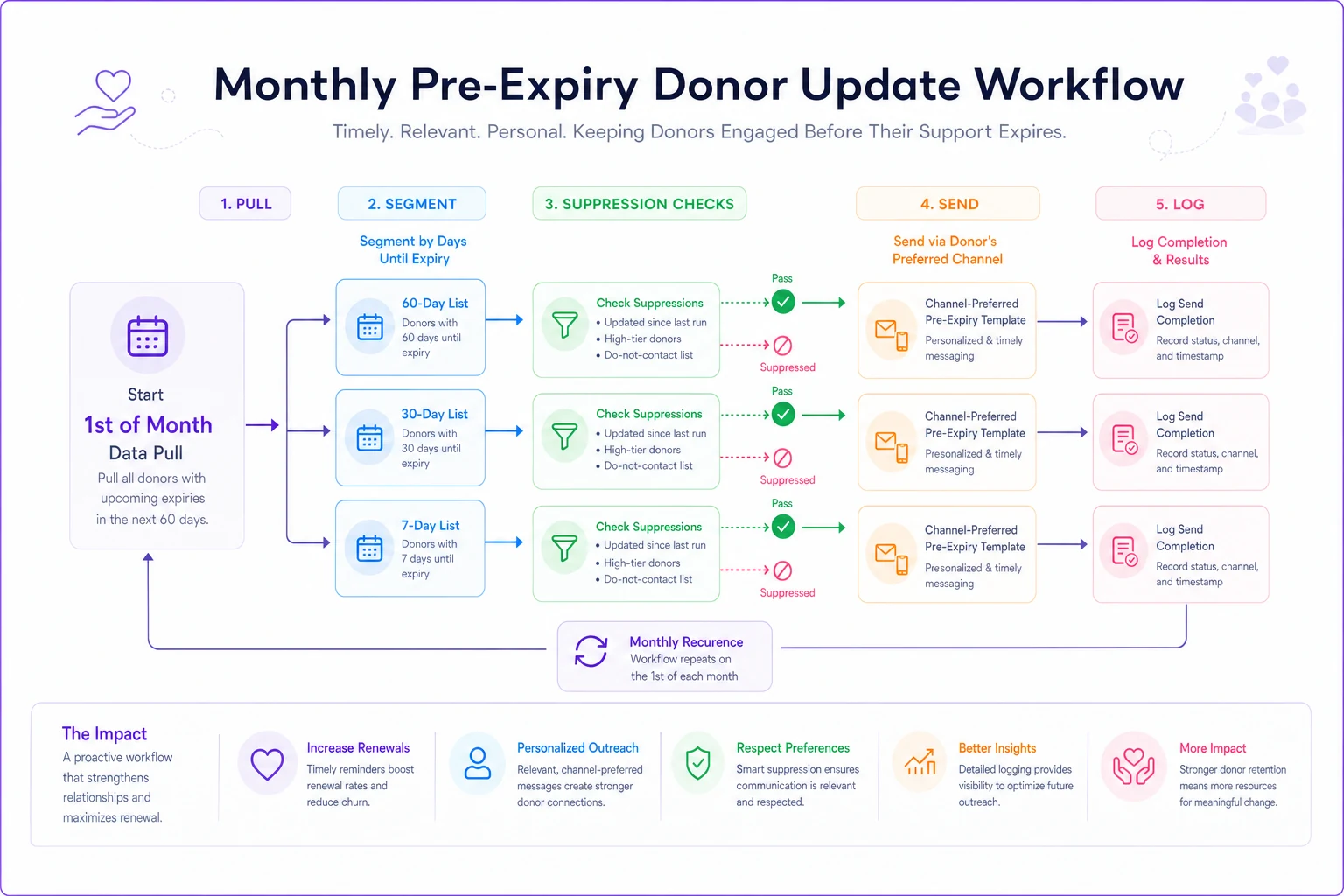
On the 1st of each month, pull three lists from your recurring donors: cards expiring in ~2 months (60-day group), ~1 month (30-day group), and next month (7-day group, timed to the specific expiry dates).
-
Suppress anyone who already updated their card since the last run. This is the single most important rule and the one most often forgotten.
-
Suppress anyone flagged as a major/high-tier recurring donor and route them to a staff member instead of the automated template.
-
Send the appropriate channel-preferred template to each remaining group.
-
Log every send and every completed update so the next month's suppression works.
A few rules that keep this from going sideways:
-
One update completion cancels all remaining touches. If a 60-day donor updates immediately, they should never receive the 30- or 7-day message. Nothing erodes trust like being nagged to fix something you already fixed.
-
Cap the total number of card-update messages per donor per cycle at three. If they haven't responded across three touches and Account Updater didn't catch it, let the failed-payment recovery flow take over — but that's now the exception, not the norm.
-
Keep a manual review step for anything above a set gift size. Automation handles volume; humans handle relationships.
This is where an operational platform earns its keep — not by doing anything clever, but by running the monthly pull, applying suppression, and logging completions reliably so a two-person team doesn't have to remember to do it. The value isn't automation for its own sake; it's that the workflow keeps running the same way every month even during your busiest season, when this is exactly the kind of task that otherwise gets dropped.
Here's a simple workflow diagram.
The value isn't automation for its own sake; it's that the workflow keeps running the same way every month even during your busiest season, when this is exactly the kind of task that otherwise gets dropped.
A realistic example of what this recovers
Consider a mid-sized nonprofit with roughly 1,800 active monthly donors averaging around $28/month. Card expirations don't happen evenly, but somewhere around 3–5% of recurring cards hit expiration in any given year without being auto-updated by the card networks — call it 60 to 90 donors annually who would silently drop off without intervention.
Before building a pre-expiry cadence, this org only caught these after the charge failed, and their after-failure reactivation ran around 40%. So of, say, 75 at-risk donors, they'd recover about 30 and lose 45. At $28/month, those 45 lost donors represent roughly $15k in annualized recurring revenue gone — every year, quietly.
After putting a 60/30/7 workflow in place, most of those cards got updated before failing. Pre-expiry update rates tend to land much higher than post-failure recovery — somewhere in the 65–75% range when the cadence and templates are done right, because you're asking a happy donor for a small favor instead of a lapsing donor for a re-commitment. Recovering 50-plus of those 75 instead of 30 is a swing of roughly $7k–$8k a year in retained recurring giving, from a workflow that runs once a month and mostly automates itself.
The number that matters more than the dollars: donors who never experienced a failed charge don't remember the moment as friction. There's no cancellation prompt in their head, no "should I keep giving to this group" question. The gift just continues.
When this makes sense — and when it doesn't
This workflow earns its setup effort if:
-
You have a meaningful base of recurring donors (a few hundred or more).
-
Your processor stores card expiration data you can actually query.
-
You're currently only reacting after payments fail.
It's probably overkill if:
-
You run almost entirely on one-time gifts and have a handful of recurring donors — in that case, a quarterly manual check of expiring cards is enough, no automation needed.
-
Your processor's Account Updater already handles the vast majority of card refreshes and your involuntary churn is negligible. Measure before you build.
Don't build this if you haven't confirmed the tokenization acceptance criteria first. A card-update campaign running on a setup that creates duplicate subscriptions will cause more donor harm than the churn it's trying to prevent.
The takeaway
Expired-card churn is unusual among nonprofit problems because it's completely predictable — the failure date is printed on the card and stored in your system. Every donor you lose to an expired card is one you had months of warning to save.
A standards-based 60/30/7 cadence, channel-appropriate templates, clean tokenization, and a few minimal automation rules turn that dead expiration data into a quiet retention engine. Build the pre-expiry side first, and you'll find your failed-payment recovery workflow — the stressful, lower-converting one — has a lot less to do.
Ready to elevate your nonprofit impact?
Join 2,000+ nonprofits using Almosly to boost fundraising efficiency, deepen donor relationships, and scale philanthropic impact.