

Offline gifts are where clean data goes to die. Checks arrive in the mail, someone drops cash at a gala table, a board member forwards a stock transfer confirmation, and a matching gift shows up three weeks later under a company name nobody recognizes. Meanwhile your online gifts flow into the CRM automatically and everyone assumes the books are fine.
They're usually not. The gap between what the bank says you received and what your CRM says donors gave is where most small nonprofits quietly lose accuracy — and eventually, trust. This is a walkthrough of a reconciliation process built for teams of two to eight people running a straightforward CRM, not Salesforce with a full ops team behind it.
Where the money actually goes missing
The problem is rarely the online donations. Stripe, PayPal, your donation page — those push clean records with timestamps and transaction IDs. The chaos lives in everything that touches a human hand before it touches the database.
A typical breakdown looks like this. A development coordinator collects the week's mail on Thursday: four checks, two of them with no note about which appeal they're for. One check is from a donor-advised fund with a grant letter attached. Somebody deposits the batch at the bank on Friday. The following Tuesday, a different person enters the gifts into the CRM from a sticky note and a photocopy. By the time month-end comes, the deposit total in the bank doesn't match the gift total in the CRM, and nobody can remember why there's an $85 difference.
Multiply that across cash gifts, in-kind donations, stock transfers, employer matches, and event revenue, and you get the recurring nightmare: donation reconciliation for a nonprofit becomes a monthly forensic exercise instead of a quick check.
-
No standard intake. Gifts get captured differently depending on who opened the envelope.
-
No batching discipline. Gifts get entered one-off, whenever someone has time, so bank deposits and CRM entries never line up cleanly.
-
No log of decisions. When someone splits a $500 gift across two campaigns or assigns a mystery check to "general fund," there's no record of the reasoning.
Fix those three, and reconciliation stops being a crisis.
Start with intake, not entry
Most teams jump straight to "we need to enter gifts faster." Wrong end of the problem. If the information isn't captured consistently at the moment a gift arrives, no amount of fast data entry saves you. You're just entering garbage quickly.
Stop missing fundraising opportunities.
Almosly helps you plan, track, and optimize every campaign with ease.
- Centralized donor and volunteer management
- Automated engagement workflows
- Impact and fundraising analytics
No credit card required
The single highest-leverage change is a standard intake form — filled out for every offline gift before it's deposited or entered. Not a fancy form. A repeatable one. Same fields, every time, whether it's a $20 cash gift or a $10,000 check.
Here's a workable intake template you can adapt:
| Field | What it captures | Why it matters |
|---|---|---|
| Date received | The day it physically arrived | Separates "received" from "deposited" and "entered" |
| Gift type | Check / cash / stock / in-kind / matching | Different types reconcile differently |
| Amount | Face value | Obvious, but write it before deposit |
| Donor name (as written) | Exactly how it appears | Prevents guessing later |
| Appeal / campaign | If known | The #1 field people skip |
| Batch ID | Assigned at intake | The link between bank and CRM |
| Notes / restrictions | Anything on the check memo or letter | Catches restricted gifts early |
| Handled by | Who logged it | Accountability without blame |
The "batch ID" field is the quiet hero here. It's the string that lets you tie a bank deposit to a set of CRM entries later. Without it, reconciliation is guesswork.
Assign the batch ID at intake so the deposit and CRM entries can be tied together later.
One pattern worth flagging: teams often skip the intake form for "obvious" gifts — the recurring donor who sends the same $100 check every month. Those are exactly the gifts that create silent errors, because everyone assumes they know what it is and nobody writes down the appeal or checks whether it's restricted this time.
Batching rules that make the bank match the CRM
The reason your deposit total and your CRM total never agree is almost always a batching mismatch. You deposited seven gifts in one trip but entered them into the CRM across three different sessions. Now there's no clean grouping to compare.
The rule is simple and non-negotiable: the CRM batch must match the bank deposit exactly. Same gifts, same total, same batch ID. If four checks and one cash gift went into a single deposit, those five gifts form one batch in the CRM.
-
One deposit = one batch. Never split a deposit across batches or combine two deposits into one.
-
Assign the batch ID at intake, not at entry. The person opening the mail creates the batch, so it exists before the gifts scatter.
-
Lock the batch total before entry begins. Write down "5 gifts, $1,340" and enter against that number. If your CRM entries hit $1,315, you know immediately something's off.
-
Cash gets its own handling note. Cash is the highest-risk category. Count it twice, with two people if you can, and record the count on the intake form.
-
Stock and DAF gifts get separate batches. They settle at different values and dates than the letter suggests, so mixing them into a check batch guarantees a mismatch.
A real example of why this matters: a small arts nonprofit was running 40–60 offline gifts a month with no batching rules. Their monthly reconciliation regularly showed discrepancies of $200–$600, and tracking each one down ate roughly half a day every month. Once they enforced one-deposit-one-batch with locked totals, most months reconciled in under 30 minutes because any mismatch was isolated to a single small batch instead of buried somewhere across the whole month.
The daily and weekly reconciliation checklist
Reconciliation shouldn't be a month-end event. When you only check at month-end, you're debugging four weeks of accumulated errors at once, often after the people who made them have forgotten the details. Small, frequent checks are dramatically cheaper than one big one.
Split it into a light daily pass and a slightly heavier weekly pass.
Daily (5–10 minutes, on days gifts come in):
-
[ ] Every offline gift received today has a completed intake form
-
[ ] Each gift is assigned to a batch ID
-
[ ] Cash counted and initialed by whoever handled it
-
[ ] Any restricted or unusual gifts flagged for review
Weekly (20–30 minutes):
-
[ ] Every bank deposit from the week has a matching CRM batch
-
[ ] Each batch's CRM total equals its deposit total (to the cent)
-
[ ] Online gift payouts (Stripe/PayPal) reconciled against processor reports
-
[ ] Fees recorded so gross vs. net is clear
-
[ ] Any gift missing an appeal/campaign assigned or escalated
-
[ ] Discrepancies over a set threshold (say $25) documented, not just fixed silently
That last threshold point matters more than it looks. Teams either chase every penny obsessively or ignore differences entirely. Pick a small dollar amount, document anything above it, and let tiny rounding differences on fees go — but write down that you let them go. That's the difference between a clean audit trail and a black hole.
If you're building this alongside a broader data cleanup, it pairs naturally with an operational impact-measurement process you can actually run, since reconciled gift data is the foundation everything else reports on.
Audit logging: write down why, not just what
This is the part almost every small team skips, and the part that saves you during an audit or a staff transition: logging the decisions, not just the transactions.
Your CRM records that a $500 gift was entered. What it usually doesn't capture is that you split it $300 to the capital campaign and $200 to general operating because the donor's letter said so, and that call was made by the development director on a specific date. Six months later, when the finance committee asks why that gift was split, "I think Maria decided that" is not an answer.
A lightweight audit log doesn't need software. A shared spreadsheet or a running note works fine, as long as it captures:
-
What changed — the gift, the amount, the split, the reassignment
-
Why — the reason, referencing the donor letter or a conversation
-
Who — the person who made the call
-
When — the date
The gifts that need logging most are the judgment calls: split gifts, restricted-fund assignments, reassignments from "general" to a specific appeal, refunds, and anything corrected after the fact. Routine straightforward gifts don't need a narrative. The exceptions absolutely do.
The audit log gets valuable at exactly the moment you don't have it. When a longtime staffer leaves and takes their mental model of "how we handle the Henderson Foundation gifts" with them, the log is the only thing standing between you and rebuilding that knowledge from scratch. This is doubly true during a system change — if you're moving platforms, a decision log is one of the few things that survives the transition intact, which is worth thinking through alongside a proper donor-focused CRM migration checklist.
A short real scenario
A community food bank with a three-person development team was processing roughly 150–200 offline gifts a month, mostly checks and gala cash. Month-end reconciliation regularly ran two full days because deposits and CRM entries never matched cleanly, and they'd routinely find gifts entered under the wrong campaign after appeal reports had already gone to the board.
They didn't buy new software. They introduced a one-page intake form, enforced one-deposit-one-batch, added a weekly 25-minute reconciliation check, and started keeping a simple decision log in a shared sheet.
Within two months, month-end reconciliation dropped from roughly two days to about half a day. Campaign misattributions — the thing that had been quietly embarrassing them in front of the board — dropped to nearly zero, because appeals were now assigned at intake instead of guessed at entry. Nothing dramatic happened. It just stopped being chaos.
When this level of process makes sense — and when it doesn't
This process is built for a specific situation, and it's worth being honest about the fit.
It makes sense when:
-
You're handling more than roughly 30–40 offline gifts a month
-
Multiple people touch gifts before they hit the CRM
-
You've had at least one reconciliation surprise that made the board nervous
-
Your gift mix includes cash, stock, DAF, or in-kind — the messy stuff
It's overkill when:
-
You process a handful of offline gifts a month and one person handles all of them start to finish
-
Nearly all your giving is online and already flows in clean
In that second case, forcing batch IDs and daily checks onto five checks a month just adds friction. Do the weekly reconciliation, keep a simple log for the rare judgment call, and skip the rest.
Who should not do this yet: teams that haven't fixed intake first. If you layer batching rules and audit logs on top of inconsistent gift capture, you're just documenting the chaos more thoroughly. Get the intake form working for a month before adding anything else.
Where lightweight tooling helps
None of this requires a big platform — that's the point. A form, a spreadsheet, and a recurring calendar block will carry a small team a long way.
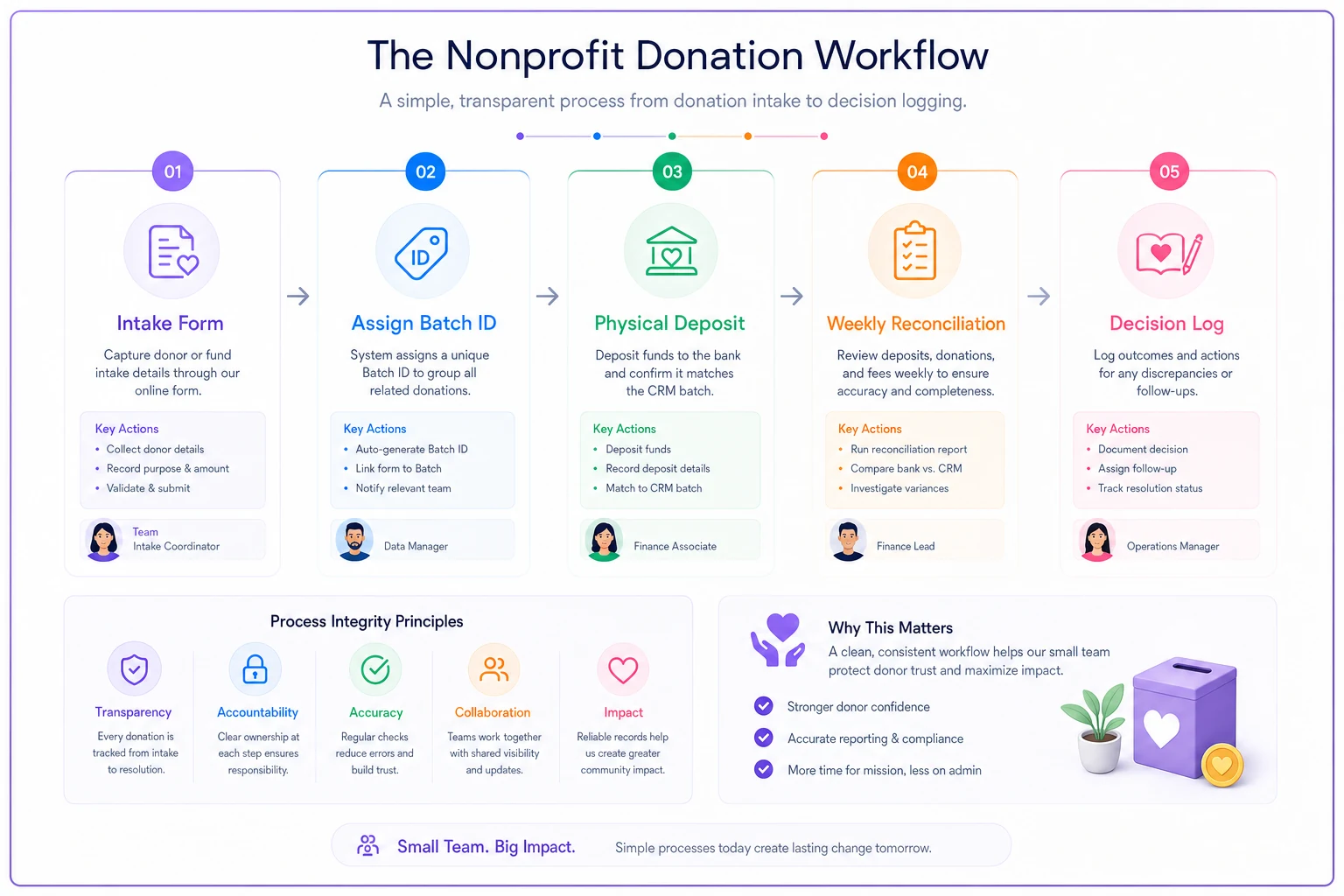
The reason teams eventually reach for operational software isn't the reconciliation math; it's the coordination. Making sure the intake form actually gets filled out, the weekly check doesn't get skipped during a busy campaign week, and the decision log stays current across three people is a workflow problem more than a data problem. That's where a simple workflow platform with intake forms, assigned tasks, and automatic activity logging earns its place — it enforces the checklist so the process survives busy weeks and staff turnover instead of quietly dropping the moment someone gets slammed.
A visual of this simple coordination workflow can be handy.
But the process comes first. Bolt tools onto a process that already works; don't use tools to substitute for one that doesn't.
The takeaway
Reconciliation problems feel like accounting problems, but for small nonprofits they're really intake and coordination problems wearing an accounting costume.
Standardize how gifts get captured, force your CRM batches to match your bank deposits, run small frequent checks instead of one painful month-end scramble, and write down the why behind every judgment call. Do those four things consistently and the mystery discrepancies mostly disappear — not because you got better at hunting them down, but because you stopped creating them in the first place.
Standardize how gifts get captured, force your CRM batches to match your bank deposits, run small frequent checks instead of one painful month-end scramble, and write down the why behind every judgment call. Do those four things consistently and the mystery discrepancies mostly disappear — not because you got better at hunting them down, but because you stopped creating them in the first place.
Ready to elevate your nonprofit impact?
Join 2,000+ nonprofits using Almosly to boost fundraising efficiency, deepen donor relationships, and scale philanthropic impact.