

Three weeks into their CRM migration, the development director at a regional food bank realized they hadn't sent acknowledgment letters for 847 donations. Not because the team forgot—but because the new system was recording gifts without triggering the automated thank-you workflow that had been running flawlessly for years.
The migration had gone "smoothly" from an IT perspective. Data transferred. Fields mapped correctly. Login credentials distributed. Yet somehow they'd created a three-week donor communication blackout that would take months to recover from.
This happens constantly during nonprofit CRM migrations. The technical pieces work fine while the donor-facing operations collapse. You end up with angry major donors who didn't receive their quarterly impact reports, monthly sustainers confused about duplicate charges, and volunteers showing up for shifts that were never confirmed.
The real damage happens in trust. Donors who experience communication gaps during your migration don't think "oh, they must be upgrading their systems." They think you're disorganized. They wonder if their money is being managed properly. Some quietly stop giving.
Why nonprofit migrations create unique continuity risks
Corporate CRM migrations focus on sales pipelines and customer data integrity. Nonprofit migrations carry different stakes—you're managing relationships built on trust, emotional investment, and voluntary participation.
When a retail company botches a migration, customers might experience delayed shipping or incorrect invoices. Annoying, but recoverable. When a nonprofit breaks donor communication continuity, you're damaging relationships that took years to build. A major donor who doesn't receive their personalized acknowledgment for a $50,000 gift notices immediately. A monthly sustainer who gets charged twice calls their bank to dispute both transactions.
The challenge compounds because nonprofit teams typically run these migrations without dedicated IT resources. Your development coordinator becomes an accidental database administrator. Your communications manager suddenly needs to understand API webhooks. Everyone's doing migration tasks on top of their regular workload, which already stretched them thin.
Most nonprofit CRM migration guides focus on data transfer—getting records from System A to System B intact. But keeping your donor communications running smoothly during the transition requires different planning. You need parallel processes, communication redundancies, and validation checkpoints that most migration checklists completely miss.
The parallel run strategy most nonprofits skip
Running two systems simultaneously sounds like double the work, and honestly, it is. But the alternative—discovering communication failures after you've fully switched over—creates exponentially more problems.
Stop missing fundraising opportunities.
Almosly helps you plan, track, and optimize every campaign with ease.
- Centralized donor and volunteer management
- Automated engagement workflows
- Impact and fundraising analytics
No credit card required
An effective parallel run actually looks like this:
Week 1-2: Shadow Mode
Keep your old CRM as the primary system while the new one runs alongside it. Every donation, every volunteer signup, every event registration gets entered in both systems. Yes, this means duplicate data entry temporarily. The new system sends all automated communications to a test inbox, not to actual donors.
Week 3-4: Selective Testing
Choose specific donor segments to pilot on the new system. Start with board members and staff donors—people who'll forgive minor hiccups and provide useful feedback. Route their communications through the new system while everyone else stays on the old platform.
Week 5-6: Graduated Rollover
Move donor segments gradually based on risk levels. Monthly sustainers first (predictable giving patterns make issues easier to spot). Event attendees next. Major donors last—only after you've validated everything works perfectly.
During parallel runs, maintain a reconciliation log. Every morning, someone compares key metrics between systems:
-
Yesterday's donation count
-
Acknowledgment letters sent
-
Recurring gifts processed
-
Event registrations received
-
Volunteer hours logged
Discrepancies get investigated immediately, not at the end of the week when details are fuzzy.
Label test communications clearly to avoid accidentally sending them to real donors.
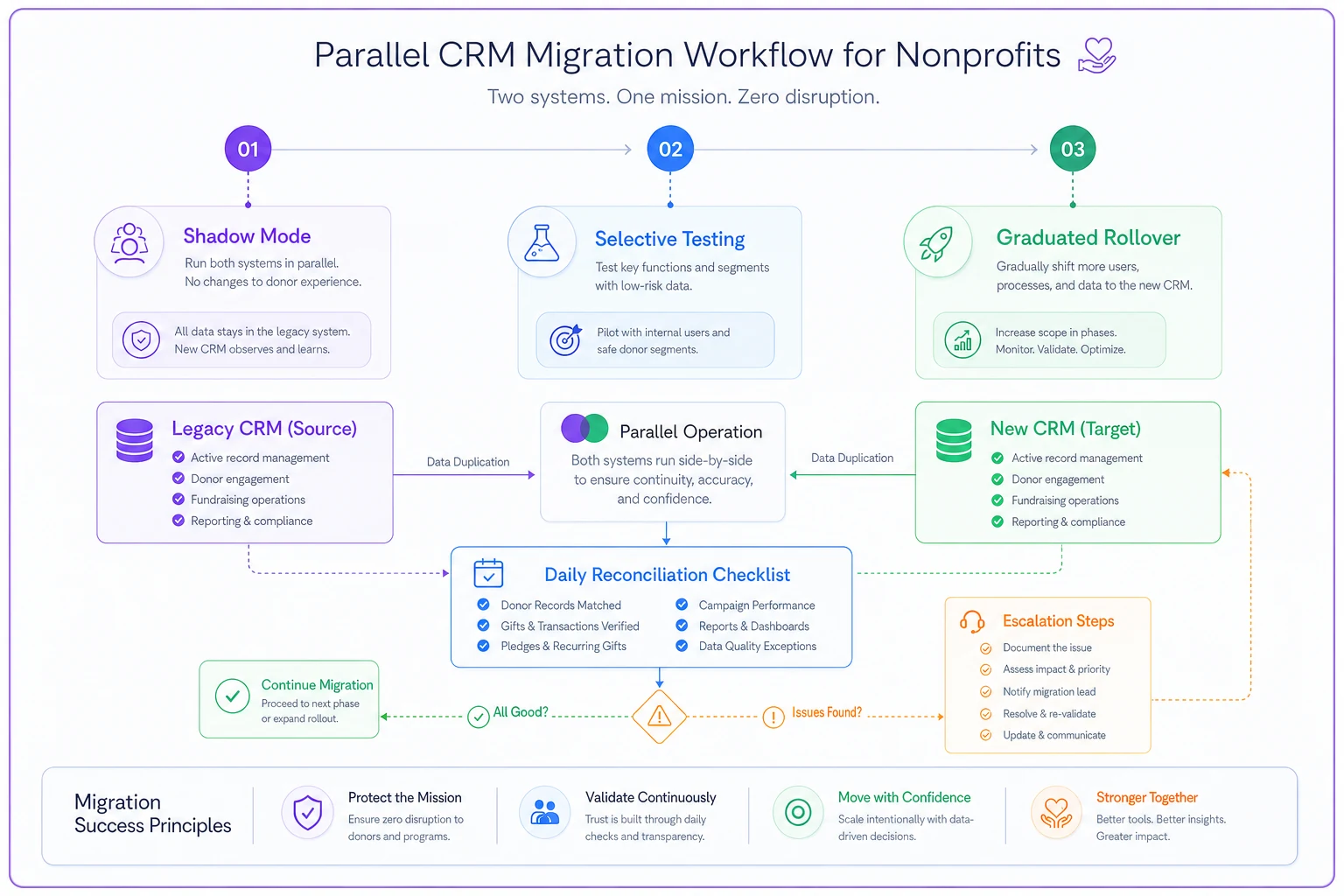
This diagram shows the parallel-run stages and daily reconciliation checkpoints.
Communication SLAs that actually protect donor relationships
Service Level Agreements usually live in IT departments, but during CRM migrations, your donor communications need them desperately. Without clear response timeframes, acknowledgments drift, updates get missed, and donors start wondering if you received their support.
Build temporary SLAs for migration period:
| Communication Type | Normal SLA | Migration SLA | Backup Process |
|---|---|---|---|
| Gift acknowledgments | 48 hours | 24 hours | Manual email if system fails |
| Recurring gift confirmations | Immediate | Within 4 hours | Phone call for amounts over $500 |
| Event registrations | 2 business days | Same day | Spreadsheet tracking + manual confirm |
| Volunteer scheduling | 3 days | 48 hours | Text message for shifts within 72 hours |
| Major donor reports | Monthly | Weekly check-ins | Personal call if any delays |
Notice the migration SLAs are actually tighter than normal operations. Counterintuitive, but necessary. During regular operations, a three-day delay in acknowledging a gift might go unnoticed. During migration, that same delay could indicate a systematic failure affecting hundreds of donors.
Create escalation triggers. If any communication misses its migration SLA:
-
Immediate manual intervention to contact donor
-
Root cause investigation within 24 hours
-
Process adjustment within 48 hours
-
All-team notification if pattern detected
Assign specific people to monitor each SLA. Not "the development team" but "Sarah checks gift acknowledgments at 9am and 3pm daily." When everyone's responsible, nobody's responsible.
Validation tests that catch problems before donors notice them
Testing gift processing in a sandbox environment tells you the transaction works. It doesn't tell you whether Mrs. Henderson will receive her acknowledgment letter with the correct tax deduction amount, her name spelled right, and her cumulative giving history accurate.
The Monthly Sustainer Test
-
Initial confirmation email arrives within 4 hours
-
Credit card gets charged on the correct date
-
Acknowledgment includes proper tax language
-
Donor portal shows accurate giving history
-
Subsequent months process automatically
-
Annual summary generates correctly
Run this test with multiple payment methods. Credit cards, ACH transfers, and PayPal often trigger different workflows. A migration that handles Visa perfectly might completely bungle American Express transactions.
The Major Donor Journey
-
$10,000 donation processes correctly
-
Personalized acknowledgment generates (not the standard template)
-
Wealth screening data transfers
-
Giving history calculates cumulative totals accurately
-
Assigned gift officer receives notification
-
Pledge payment schedules migrate properly
The food bank I mentioned? They discovered their major donor acknowledgment workflow relied on a custom field that didn't map to the new system. Every gift over $5,000 was triggering the standard thank-you email meant for $25 donors.
The Event Registration Cascade
Events create complex data flows—registration, payment, dietary preferences, seating assignments, auction bidding. Test an end-to-end event experience:
-
Online registration form captures all fields
-
Payment processes successfully
-
Confirmation email includes correct event details
-
Reminder emails schedule properly
-
Check-in lists generate accurately
-
Post-event follow-up triggers
Test edge cases too. What happens when someone registers for an event then increases their sponsorship level? When a table captain adds guests after initial registration? When someone requests a refund? These scenarios break migrations constantly.
Building redundant communication channels
Your primary email platform fails during migration. Your backup system has incomplete data. Now what?
Channel Diversification
-
Text messaging for monthly sustainers
-
Phone calls for major donors
-
Direct mail for planned giving prospects
-
Personal emails from gift officers for top 50 donors
A children's hospital in Denver maintained a simple spreadsheet during migration with every donor's preferred backup contact method. When their email integration failed for four days, they manually contacted 200+ donors through alternative channels. Not elegant, but it preserved trust.
The Daily Digest Protocol
-
Who gave yesterday
-
Who should have received communications
-
Who actually received communications
-
Gaps requiring manual intervention
This isn't about data reconciliation—it's about catching individual donors who might fall through cracks. The development associate spending 30 minutes each morning manually emailing missed acknowledgments prevents relationship damage worth thousands.
Communication Templates for Migration Issues
"We're currently updating our systems to serve you better. If you experience any delays in communication or have questions about your recent gift, please contact me directly at [personal email]. Your support means everything to our mission, and we want to ensure you're properly acknowledged."
Notice what this doesn't say: "We're experiencing technical difficulties" or "Our new CRM is having issues." Keep the focus on serving donors better, not your internal challenges.
Protecting monthly sustainers during transition
Monthly sustainers present unique migration risks. Their recurring gifts often rely on payment tokens, scheduling rules, and notification triggers that break easily during system transitions.
What typically goes wrong:
-
Payment tokens don't transfer, causing all recurring gifts to fail
-
Scheduling rules reset, charging everyone on the same day
-
Notification settings default, overwhelming donors with confirmations
-
Payment processor connections break, creating duplicate charges
A youth mentorship organization learned this painfully when their migration charged 400 monthly donors twice in one week. The payment processor integration appeared to fail, so transactions were manually re-run. Turns out the integration worked fine—it just had a 48-hour delay in posting. By the time they realized the error, dozens of donors had already disputed charges with their banks.
Pre-Migration Sustainer Audit
-
Name and contact information
-
Gift amount and frequency
-
Payment method and next charge date
-
Communication preferences
-
Lifetime value and tenure
The Sustainer Safety Period
Block all recurring payment processing for 72 hours during actual migration. Yes, this might delay some gifts by a few days. But it prevents the double-charging catastrophe that destroys donor trust instantly. Send a simple notification: "We're updating our systems this week. Your monthly gift of $[amount] will process as usual on [date]."
Post-Migration Validation
-
Payment token transferred correctly
-
Schedule matches previous system
-
Amount matches authorization
-
Communication preferences preserved
Then do a limited test run—process 10 recurring gifts manually and verify everything works before enabling automatic processing for everyone.
The donor portal continuity problem nobody talks about
Your donors probably access their giving history through an online portal. During migration, that portal either disappears temporarily or shows incomplete information. Either scenario creates anxiety and erodes trust.
Historical Data Preservation
Before touching anything, generate PDF snapshots of every donor's portal view showing their complete history. Store these as backup documentation. If the migration corrupts historical data, you have proof of past giving.
The Bridge Portal Strategy
-
Static page showing "System maintenance in progress"
-
PDF downloads of recent giving history
-
Direct phone/email contact for urgent needs
-
Expected restoration timeline
One arts organization created a temporary WordPress site that looked identical to their donor portal login page but displayed a maintenance message with personalized giving summaries they'd pre-generated for their top 500 donors. Not fancy, but it prevented confusion during a three-week migration.
Maintaining trust when things break
Even perfect migrations hit unexpected problems. A payment processor changes their API without notice. A data field that seemed properly mapped starts generating errors. An integration that tested fine in sandbox fails under real-world load.
The Rapid Response Framework
First 2 hours after detecting issue:
-
Identify scope of impact
-
Stop any automated processes that might compound the problem
-
Assign specific team member to donor communication
Within 24 hours:
-
Personal contact to affected donors
-
Clear explanation without technical jargon
-
Specific resolution timeline
-
Alternative way to complete their intended action
Within 72 hours:
-
Problem resolved or clear workaround in place
-
Follow-up communication to confirm resolution
-
Internal documentation of issue and fix
Transparency Without Oversharing
Donors need to know you're aware of issues and fixing them. They don't need a technical dissertation on database architecture.
Bad communication: "Our API integration between the CRM and payment processor failed during the migration due to an authentication token mismatch."
Better communication: "We identified an issue affecting gift processing on Tuesday. Your donation was received successfully, and you'll receive your acknowledgment by Thursday. Thank you for your patience as we improve our systems."
Post-migration validation that actually confirms success
The 30-Day Validation Protocol
Week 1: Daily reconciliation
-
Gift counts match payment processor
-
Acknowledgments sent equal donations received
-
Email bounce rates remain steady
-
Donor portal login success rates normal
Week 2-3: Weekly pattern analysis
-
Recurring gifts processing on schedule
-
Email engagement rates consistent
-
Event registrations flowing properly
-
Volunteer scheduling working
Week 4: Monthly cycle completion
-
Monthly sustainers charged correctly
-
Financial reports reconcile
-
Donor segmentation rules working
-
Automated campaigns triggering properly
The Donor Satisfaction Check
Two weeks post-migration, survey a sample of active donors:
-
Have you received appropriate acknowledgment for recent gifts?
-
Any issues accessing your giving history?
-
Communication frequency feel right?
-
Any technical problems to report?
Keep it short—three or four questions maximum. You're checking for problems, not conducting comprehensive satisfaction research.
Building your nonprofit CRM migration checklist
After watching dozens of nonprofits navigate CRM migrations, the ones who maintain donor trust follow remarkably similar patterns. They prioritize communication continuity over data perfection. They build redundancies before removing old systems. They test complete donor journeys, not just technical functions.
Pre-Migration (4 weeks out)
-
Complete donor data audit with external backup
-
Document all automated communication workflows
-
Assign communication SLA monitors
-
Create validation test scenarios
-
Build backup communication channels
-
Prepare migration issue templates
During Migration
-
Run parallel systems with daily reconciliation
-
Test complete donor journeys before go-live
-
Maintain tighter SLAs than normal operations
-
Generate daily gap reports for manual intervention
-
Block recurring charges during transition
Post-Migration
-
30-day validation protocol
-
Donor satisfaction spot-checks
-
Document lessons learned
-
Update disaster recovery plans
The food bank I mentioned at the beginning? They ran their second migration eighteen months later (migrating from their interim solution to a permanent platform). This time, zero donor communications were missed. Same team, same complexity, completely different outcome because they'd learned to prioritize donor continuity over technical metrics.
The hidden ROI of donor-centric migration
Organizations that maintain donor communication continuity during CRM migrations see measurable benefits beyond avoiding disasters. Their donor retention rates actually increase post-migration because the extra attention during transition strengthens relationships.
The proactive communication, tighter SLAs, and personal touches required during migration remind donors they're valued. The monthly sustainer who receives a personal call confirming their gift processed correctly feels more connected. The major donor who gets weekly updates during migration sees an organization that manages change professionally.
Modern AI-powered operational software makes this level of attention sustainable even for small nonprofits. Automated monitoring can catch communication gaps, flag donors at risk of falling through cracks, and handle routine validation tasks. But the strategy—prioritizing donor experience over technical metrics—requires human judgment and organizational commitment.
Your next CRM migration doesn't have to create a trust crisis. With proper planning focused on donor continuity rather than just data integrity, you can emerge with stronger relationships and more engaged supporters. The technology should serve your mission, not compromise it.
Ready to elevate your nonprofit impact?
Join 2,000+ nonprofits using Almosly to boost fundraising efficiency, deepen donor relationships, and scale philanthropic impact.