

The scary part about fundraising automation isn't that it fails loudly. It's that it fails quietly, at scale, to the exact people you most needed to treat carefully.
A broken query doesn't email one person the wrong thing. It emails 4,000 people the wrong thing before anyone notices — usually on a Friday afternoon, usually to your highest-value segment because that's the segment with the most active automations attached to it. By the time someone forwards you the angry reply from a board member's spouse, the sequence has already fired three more times.
Most nonprofits treat automation governance as a policy document — a page in a Google Drive folder nobody opens. That's not governance. Governance is the set of technical controls that sit between your automation deciding to send something and the donor actually receiving it. This piece is about building those controls specifically for donor communications, where the cost of a mistake isn't a bounced email — it's a relationship you spent seven years building.
## What actually goes wrong (and why it's worse in fundraising)
In most industries a bad automated message costs you a customer. In fundraising it costs you a legacy gift, a board relationship, or a family's trust during the single worst week of their life. The blast radius is just different.
The failure patterns that show up repeatedly tend to cluster into a handful of categories:
-
Deceased and lapsed-for-a-reason contacts. Someone asked to stop receiving mail after a bad experience, the flag lives in a note field the automation doesn't read, and they're back in the welcome series six months later.
-
Duplicate records firing duplicate sequences. A donor exists twice — once from an event import, once from the online form — and receives two thank-yous, two tax receipts with different amounts, and eventually two very confused phone calls.
-
Merge fields resolving to garbage. "Dear [First Name]," "Thank you for your gift of $0.00," "your support since 1/1/1900." Every one of these has shipped from a real nonprofit CRM.
-
Timing collisions. An emergency appeal fires the same morning as a scheduled stewardship note, so a major donor gets a heartfelt "you're irreplaceable to us" email 40 minutes before a panicked "we need your help NOW."
-
Segment leakage. A filter meant to target lapsed donors accidentally pulls in active monthly donors, who now get a "we miss you, come back" message while their card is being charged that same day.
The pattern underneath all of these: the automation did exactly what it was told. The logic was fine. The data feeding the logic was wrong, or the coordination between automations was missing. That distinction matters because it tells you where to put your guardrails — not in the message content, but in the layers around it.
## Test mode and shadow runs: see the harm before the donor does
The single highest-leverage control is dead simple and almost nobody uses it consistently: run the automation against real data but send nothing to real people.
Stop missing fundraising opportunities.
Almosly helps you plan, track, and optimize every campaign with ease.
- Centralized donor and volunteer management
- Automated engagement workflows
- Impact and fundraising analytics
No credit card required
There are two flavors worth separating.
Test mode redirects all output to an internal address. You build the sequence, flip it into test mode, and every message that would have gone to a donor lands in a staff inbox or a test list instead. You read them. You look for the $0.00, the "1/1/1900," the blank salutations. This catches merge-field failures instantly.
Shadow runs are more powerful and more overlooked. A shadow run executes the full logic — including the audience selection query — and produces a report of exactly who would have received what, without sending anything. You're not checking the message. You're checking the list.
Visualize the workflow below.
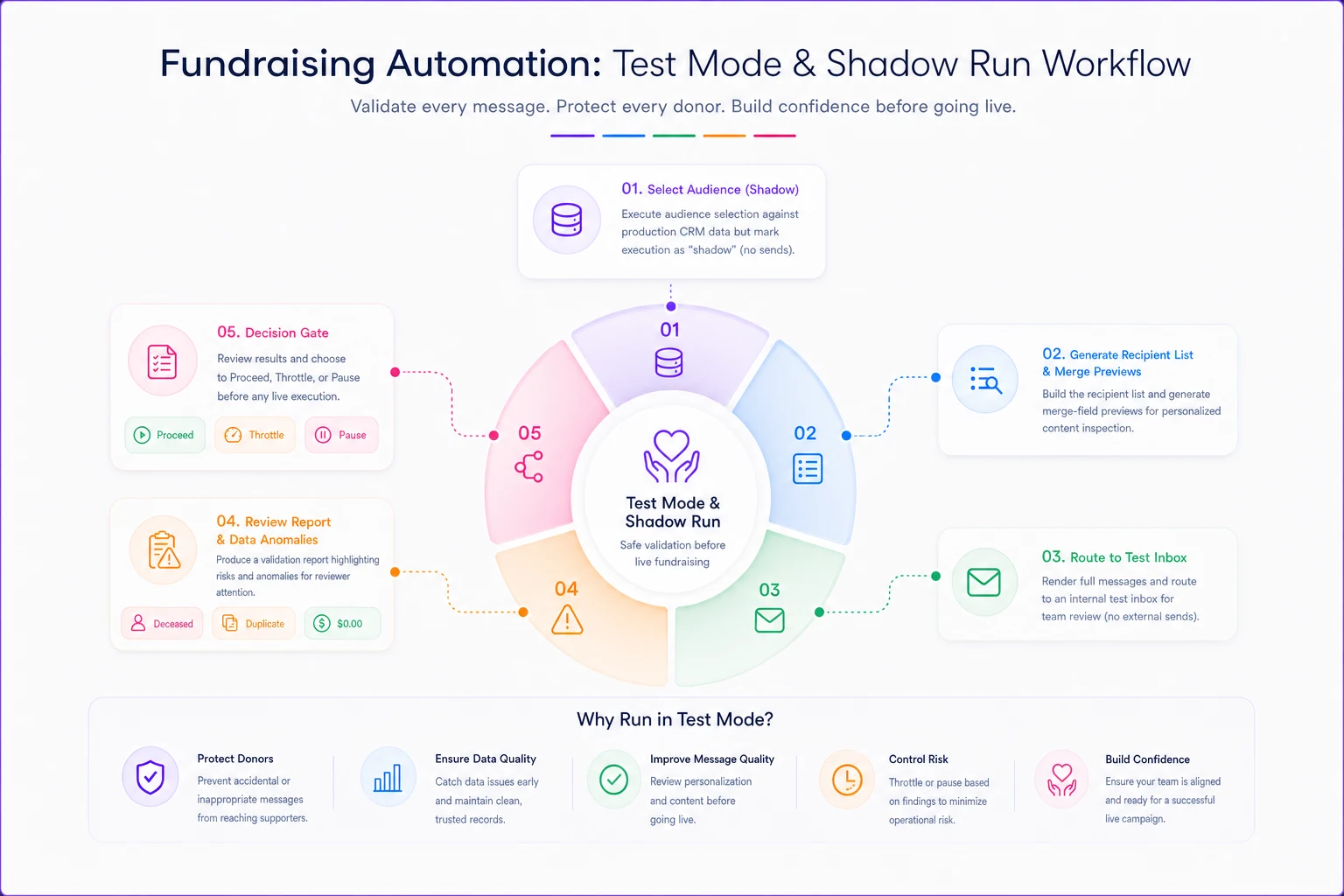
Merge-field errors are embarrassing but recoverable. Audience errors are relationship-ending. A shadow run on that "we miss you" lapsed campaign would have surfaced the 210 active monthly donors sitting in the segment before they got the wrong emotional message.
-
Pull the full recipient list the automation generated and eyeball the count. If you expected ~800 and got 3,400, stop.
-
Sort by gift date, last-contact date, and lifetime value. Look at the top 25 and bottom 25 records manually.
-
Cross-check against your suppression list. Anyone deceased, opted-out, or flagged "do not contact" who slipped through is a governance failure you just caught for free.
-
Confirm no one appears twice.
-
Spot-check 10 merge previews across different donor types — first-time, major, recurring, corporate.
Keep a small, up-to-date test list that includes edge cases like deceased, recurring, and major donors so shadow-run sampling surfaces real risks.
Fifteen minutes of shadow-run review prevents the kind of mistake that eats a full week of apology calls.
## Throttles and staged rollout: never send to everyone at once
Even a tested automation can be wrong in ways you didn't imagine. The defense is refusing to let anything reach your entire list in a single burst.
Throttling means the automation releases messages in controlled batches instead of all at once. It does two things. First, it creates a window to catch a problem while only a fraction of your audience has been affected. Second, it keeps your sending domain from getting flagged as spam when 12,000 emails leave in ninety seconds.
A staged rollout for a large donor communication looks like this:
-
Send to an internal test group (staff, one or two trusted board members). Wait. Read the replies and the actual rendered email on real devices.
-
Release to 5% of the audience, weighted toward lower-risk donors — not your top major-gift prospects. Wait 30–60 minutes.
-
Check the signals
bounce rate, unsubscribe spikes, reply sentiment, any "why did I get this?" responses.
-
Release to 25%. Recheck.
-
Release the remainder only if the first waves came back clean.
The thing most teams miss: order your rollout by risk, not by convenience. Your biggest donors should be in the last wave, not the first. If something is wrong, you want to discover it on the segment where a mistake costs you the least — not on the 12 relationships that fund a third of your budget.
## Retry logic and alert thresholds: the difference between a hiccup and a disaster
Automations fail in the middle constantly. A payment processor times out, a CRM API returns an error, an email service rate-limits you. What happens next is entirely a design choice, and most nonprofits never made that choice on purpose.
Bad retry logic is where donor harm hides. The classic example: a receipt automation fails to confirm delivery, so it retries — and the donor gets the same tax receipt four times, each with a slightly different timestamp, each looking like a separate gift. Now they think they were charged four times. Now they're calling their bank.
-
Retries must be idempotent — running the same step twice produces one result, not two. A receipt should carry a unique ID so the system knows it already sent.
-
Cap the retries. Three attempts with increasing delay, then stop and alert a human. Infinite retry loops are how one stuck record sends 90 emails overnight.
-
Fail loud, not silent. A failed step that quietly gives up is worse than one that pages someone. Silent failures are how a donor's lapsed-recovery sequence just... stops, and nobody notices they were never re-engaged.
Alert thresholds are the tripwires. You define what "abnormal" looks like and the system tells you the moment it crosses that line:
| Signal | Normal range | Alert threshold | Why it matters |
|---|---|---|---|
| Unsubscribe rate per send | under ~0.5% | above 2% | A spike means wrong audience or wrong message |
| Bounce rate | under ~2% | above 8% | Suggests a bad list or a data-quality break |
| Messages sent per hour | expected batch size | 2x expected | A runaway loop or a duplicate trigger |
| Reply "why did I get this" count | near zero | 5+ in an hour | Segment leakage in progress |
| Receipt sends per donor per day | 1 | 2+ | Idempotency failure — donors seeing double charges |
The point of thresholds isn't monitoring for its own sake. It's buying time. A throttle limits the damage; an alert threshold tells you while the damage is still small enough to reverse.
## Rollback playbooks: what you do in the first 20 minutes
When something goes out wrong — and eventually it will — the response quality is entirely determined by whether you wrote the playbook before the incident. Nobody makes good decisions inventing a rollback procedure while a board member's angry email sits open in another tab.
A donor-communication rollback playbook needs to answer, on one page, before the crisis:
-
1. Kill switch. Who can pause all running automations, and how? Not "who theoretically has admin access" — who is awake, reachable, and knows the exact button. This should be doable by at least two people in under five minutes. The first move in almost every incident is stop the bleeding: pause the sequence so it stops firing to the rest of the list while you figure out what happened.
-
2. Scope assessment. Pull the send log. How many went out? To whom? A shadow-run-style report after the fact tells you the exact list of affected donors — which becomes your apology list.
-
3. Triage by relationship value. Not every affected donor needs the same response. A generic supporter who got a duplicate email is a low-priority apology. A major donor who got "we miss you" while actively giving needs a personal phone call from a named person, today.
-
4. The correction message decision. Sometimes silence is better than a correction. A follow-up "please disregard our previous email" doubles the number of messages a confused donor received and can make things worse. The rule of thumb: correct publicly only when the error created real confusion (wrong amounts, double charges); handle relationship damage privately, one call at a time.
-
5. Root cause and the flag. After the fire is out, find whether it was a data problem or a logic problem — because the fix is different. Then add the specific check that would have caught it to your pre-launch shadow run, so the same failure can't ship twice.
One pattern worth stealing: keep a "drafts, not live" default for anything touching your top donor tier. High-value stewardship messages get generated by automation but held for human release rather than sent automatically. The system does the work of drafting and personalizing; a person spends ten seconds approving before it leaves. You get most of the efficiency and almost none of the catastrophic risk on the relationships that matter most.
## A real scenario: the double-receipt week
A mid-sized environmental nonprofit — roughly 6,000 active donors, small development team — moved their year-end gift processing onto an automated receipt workflow. It worked fine in December for about ten days.
Then their payment processor had a slow afternoon. Confirmation calls started timing out. The receipt automation, built with naive retry logic and no idempotency key, interpreted each timeout as "didn't send" and tried again. Donors who gave that afternoon received their tax receipt two to four times, each showing what looked like a separate transaction.
The volume wasn't huge — around 240 donors affected. But roughly 30 called their bank to dispute what they thought were duplicate charges, and about a dozen of those were recurring donors who paused their monthly gifts out of caution. Untangling it took the team the better part of two weeks: matching bank records, reassuring donors, issuing corrected receipts, and rebuilding trust with the recurring givers who'd cancelled.
The fixes afterward were unglamorous and cheap. A unique receipt ID so retries couldn't duplicate. A retry cap of three, then a human alert. An alert threshold on "receipts per donor per day." A shadow run added to the year-end launch checklist. Total build time to add all of it: less than a day. Cost of not having had it: a two-week firefight and a handful of monthly donors they had to work hard to win back.
## When heavy guardrails make sense — and when they're overkill
Not every automation needs a five-stage rollout and an incident playbook. Governance that's too heavy just means nobody ships anything, which pushes people back to error-prone manual sends.
Apply the full stack when:
-
The message touches money (receipts, recurring charge notices, pledge reminders)
-
The audience includes major donors, board, or legacy prospects
-
The send goes to more than a few hundred people at once
-
The content is emotionally sensitive (memorial gifts, emergency appeals, anything referencing a donor's personal circumstances)
Keep it light when:
-
It's a small, internal, or opt-in list
-
The message is low-stakes and easily corrected
-
A human is already reviewing each send
The teams that get this right treat guardrails as tiered, not uniform. A newsletter to opted-in subscribers doesn't need a shadow run. A "we haven't heard from you in a while" sequence aimed at lapsed major donors absolutely does — because that's precisely the automation most likely to say the wrong thing to the person you can least afford to lose. Understanding which automations sit at which tier maps directly onto your broader donor lifecycle architecture; the higher-value, later-stage relationships are the ones that warrant the most protection.
## Where these controls tend to break down
Two moments create most donor-communication incidents, and both are predictable.
The first is CRM migration. Data moves, field mappings shift, suppression flags don't carry over cleanly, and automations you forgot were running fire against a half-migrated database. If you're in or near a system change, the guardrails above are not optional — they're the difference between a clean transition and a communication disaster. The pre-launch discipline in a good CRM migration checklist exists precisely because this is when automations do their worst damage.
The second is staff turnover. The person who built the automation leaves, nobody else knows exactly what triggers it or how to pause it, and the kill switch becomes a folk legend instead of a documented button. Governance that lives only in one person's head isn't governance. Write down who owns each automation, how to pause it, and what "normal" looks like — so the answer to "make it stop" isn't "we're not totally sure how."
## The mindset shift that actually prevents donor harm
The nonprofits that avoid these disasters aren't the ones with the fanciest software. They're the ones who stopped assuming automations are safe until proven broken, and started assuming they're dangerous until proven safe.
That reframe changes everything downstream. You shadow-run because you assume the list is wrong. You throttle because you assume the send might be a mistake. You cap retries because you assume the loop will run away. You write the rollback playbook because you assume, correctly, that something will eventually go out that shouldn't have.
None of this requires a big budget or a technical team. It requires deciding — before the next launch — that a donor communication is a promise, and that you'll build the same care into how you send it as you put into what it says. The fifteen minutes of a shadow run and the one page of a rollback playbook are cheap. The relationship with the donor who got the wrong message during the worst week of their life is not.
None of this requires a big budget or a technical team. It requires deciding — before the next launch — that a donor communication is a promise, and that you'll build the same care into how you send it as you put into what it says. The fifteen minutes of a shadow run and the one page of a rollback playbook are cheap. The relationship with the donor who got the wrong message during the worst week of their life is not.
Ready to elevate your nonprofit impact?
Join 2,000+ nonprofits using Almosly to boost fundraising efficiency, deepen donor relationships, and scale philanthropic impact.