

The tricky thing about peer-to-peer campaigns isn't getting people excited. It's the operational mess that builds up behind the scenes once 80 individual fundraisers are out there collecting money on your behalf. Every one of them is capturing supporter info in slightly different ways, tagging their pages however they feel like, and expecting their money to move somewhere reasonable at the end.
For a small team, that's where things fall apart. Not the campaign strategy — the plumbing. This piece covers the five plumbing points that cause the most pain in peer-to-peer fundraiser operations for nonprofit teams, and how to keep each of them boring and predictable.
Why P2P operations break differently than normal fundraising
Regular donations flow through one or two channels you control. In P2P, you've essentially deputized dozens of volunteers to run mini-campaigns, and each person becomes a tiny, slightly chaotic data source. The problem isn't volume — it's inconsistency multiplied across many hands.
A typical example: a 10K run with 60 participant fundraisers. Half of them set up their pages the morning of the event, name them things like "John's Page" and "Help Me Help Kids!!", skip the campaign tag entirely, and collect a mix of online donations plus envelopes of cash from coworkers. Three weeks later you're staring at a payout report trying to figure out which $240 belongs to which page, and whether the $75 "offline" entry someone logged actually hit your bank account.
The fix isn't more software or more rules. It's a small number of non-negotiable control points, enforced early, so the mess never compounds.
Control point 1: Registration data capture
Most teams treat registration as a sign-up form and nothing more. Then reporting season arrives and they realize they never captured the fields that make reconciliation possible later.
Stop missing fundraising opportunities.
Almosly helps you plan, track, and optimize every campaign with ease.
- Centralized donor and volunteer management
- Automated engagement workflows
- Impact and fundraising analytics
No credit card required
The mistake is collecting too much emotionally interesting data (why are you running?) and too little operationally critical data. For P2P you need a tight set of required fields, and you should resist the urge to make everything optional "to reduce friction."
Minimum required capture at registration:
-
Participant full name + the exact display name their page will use
-
A unique participant ID (auto-generated, never the email)
-
Email + phone (both, not either/or)
-
Which campaign/event they belong to
-
Fundraising goal amount
-
Consent flags for contact and public page visibility
-
Team affiliation (if teams are enabled)
Lock the campaign tag at registration instead of letting participants pick it later.
The single field people forget is the unique participant ID that's separate from the display name. Display names change. People edit "John's Page" to "John & Amy's Page" mid-campaign, and suddenly your matching logic breaks. A stable ID that never changes is what lets you tie a page, its donations, and its eventual payout together without ambiguity.
One pattern worth copying: lock the campaign tag at registration instead of letting participants pick it later. If the page is created from inside a specific event's registration flow, the campaign association is automatic and can't be forgotten. The pages that cause reconciliation nightmares are almost always the ones created outside the proper flow.
Control point 2: Fundraising-page tagging
Tagging is where small teams silently lose the ability to report accurately. When every participant is free-tagging their own page, you end up with 60 variations of what should be 4 categories.
You don't need rich tagging. You need governed tagging — a short, fixed taxonomy that participants can't deviate from.
| Tag type | Who sets it | Allowed values | Why it matters |
|---|---|---|---|
| Campaign | System (at registration) | Fixed list only | Ties page to the right fund |
| Team | Participant (dropdown) | Pre-created teams only | Enables team leaderboards + rollups |
| Participant ID | System | Auto-generated | Stable key for reconciliation |
| Channel origin | System | web / in-person / import | Separates online from offline |
Notice what's missing: free-text tags. The moment you allow a text box, you've created a reconciliation project for future-you. If you genuinely need custom segmentation, use a dropdown with pre-approved options and an "other → requires staff review" fallback.
In real operations, the tagging breakdown usually happens when a well-meaning staff member manually creates a page for a participant who called in. They skip the dropdown, type the campaign name slightly wrong ("Spring5K" vs "Spring 5K"), and now that page floats outside every automated report. Make manual page creation go through the exact same validated form as self-service. No shortcuts for staff.
Control point 3: Weekly reporting exports
The second most common failure after tagging is cadence. Teams export reports only when they need something — usually right before a board update or at the end of the campaign — which means problems are discovered weeks after they happened and are far harder to fix.
The weekly export should surface, at minimum:
-
New pages created this week (and whether each has a valid campaign + participant ID)
-
Pages with no campaign tag or a tag outside the approved list
-
Offline/pledged gifts logged but not yet marked as received
-
Participants with donations but no page (a sign of a broken flow)
-
Duplicate participant records (same email, two IDs)
-
Running total raised vs. deposited (the gap that becomes your reconciliation workload)
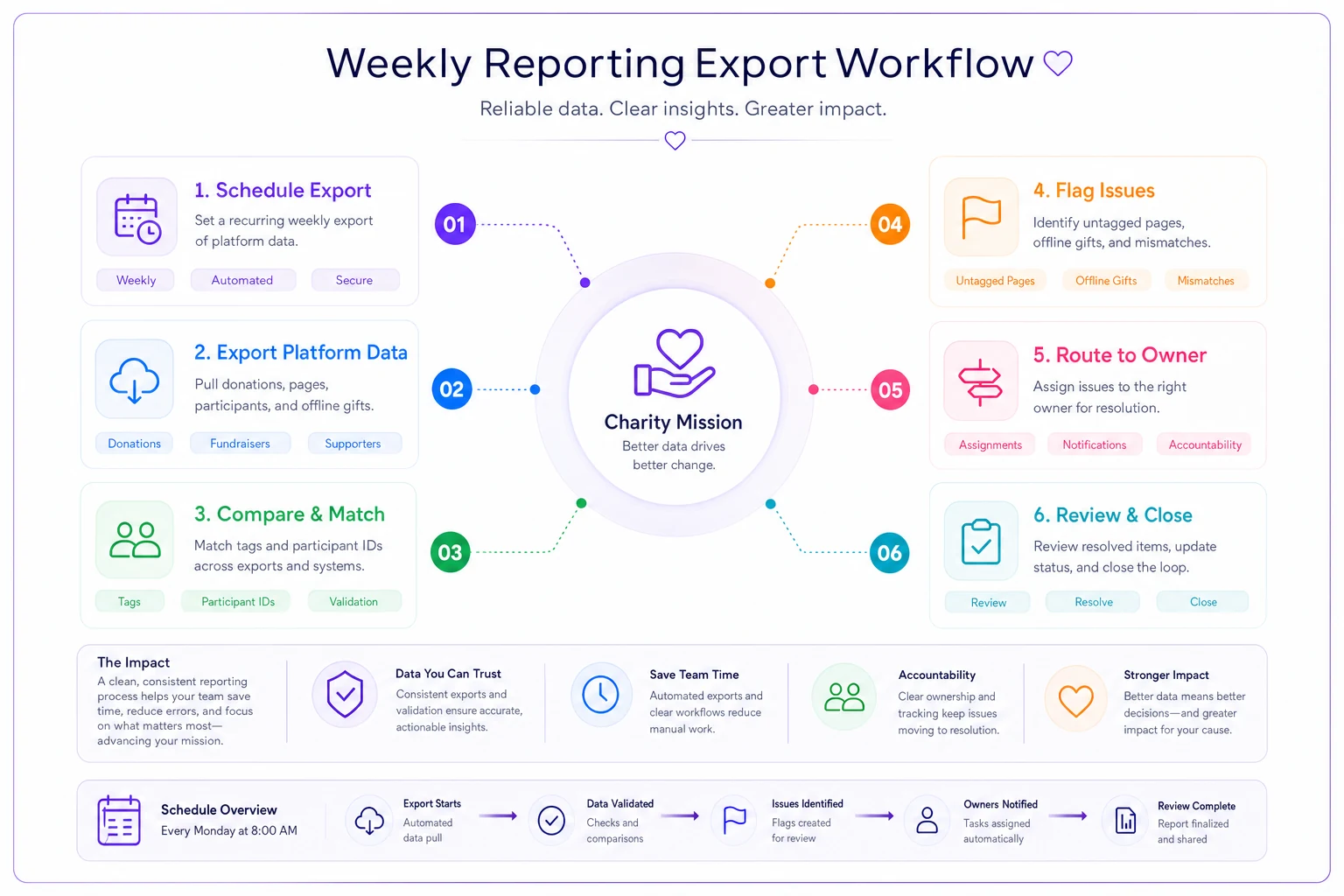
The point is to catch the untagged page, the duplicate participant, or the offline gift that was logged but never deposited, while the context is still fresh and the person who created it still remembers what they did.
Line 6 is the one people underestimate. The gap between "raised" (what the platform shows) and "deposited" (what hit the bank) is your true outstanding work. If that gap grows week over week, you have a process leak, not a data quirk. This ties directly into the broader discipline of matching recorded gifts to actual deposits — the same muscle covered in our walkthrough on running a stepwise donation reconciliation and offline-gifts process, just applied to the P2P context where the number of sources is much higher.
A practical note on who runs this: one named person, every week, same day. P2P reporting dies when it's "whoever has time." It's a 30–40 minute task if the fields are clean, and a half-day forensic exercise if it's been skipped for a month.
Control point 4: Payout approval gates
This is the control point that protects you legally and financially, and it's the one small teams most often run informally — which is exactly how mistakes and, occasionally, fraud slip through.
A payout gate means no money moves to a participant, team, or external beneficiary without passing a defined checklist. The gate isn't bureaucracy for its own sake; it's the moment where you confirm the money you think you have actually exists and belongs where it's about to go.
Payout approval checklist (every payout, no exceptions):
-
Participant/team identity verified against registration record
-
All online donations for the page cleared and settled (not just pledged)
-
All offline gifts confirmed received and deposited
-
Refunds and chargebacks reconciled and deducted
-
Platform/processing fees accounted for
-
Payout amount matches net reconciled total within tolerance
-
Second-person sign-off recorded (name + date)
That last line — a second set of eyes — is the single most valuable control on the list, and it costs nothing. Even on a three-person team, no one should be able to both initiate and approve a payout alone. Not because of distrust. Because the person closest to a page is also the person most likely to have a blind spot about it.
A common failure: approving payouts based on the "raised" total before donations have actually settled. Pledges get cancelled, cards fail, chargebacks come in 30 days later. Pay out on the gross number and you'll overpay, then have the awkward conversation of asking a volunteer to return money. Always gate on net settled, never gross pledged.
When a formal gate makes sense — and when it's overkill
For an event raising under a few thousand dollars with payouts going into your own organizational account, a lightweight single-approver check is fine. The full dual-sign-off gate earns its keep once you're disbursing funds out to teams, chapters, or beneficiaries, or once total campaign volume crosses the point where a single error could be material. If you can't comfortably absorb a mistaken $500 payout, you need the gate.
Control point 5: Final reconciliation template
Reconciliation at the end of a P2P campaign is where everything either ties out cleanly or turns into a week of detective work. The difference is almost entirely whether you built the template before the campaign or tried to reverse-engineer it afterward.
A final reconciliation template is a single sheet (or report) that reconciles three numbers against each other for every page:
-
Platform total — what the fundraising tool says each page raised
-
Bank-deposited total — what actually landed in your account
-
Payout/allocation total — where that money ended up
When all three agree per page, you're done. When they don't, the template's job is to make the discrepancy obvious and categorizable.
A workable structure, one row per participant:
| Field | Source |
|---|---|
| Participant ID | Registration |
| Display name | Page |
| Campaign tag | System |
| Online raised | Platform export |
| Offline raised | Manual log |
| Total raised | Calculated |
| Fees | Processor |
| Refunds/chargebacks | Processor |
| Net received | Calculated |
| Deposited to bank | Bank statement |
| Variance (net vs deposited) | Calculated |
| Payout/allocation | Finance |
| Status | Open / Reconciled |
The variance column is the whole point. Sort by it, and every non-zero row is a task. Most will resolve to timing (a deposit that posts next week) or fees (the processor took its cut). The rows that don't resolve easily are the ones worth your attention — a page that raised more online than was ever deposited, or an offline gift that was logged but never found.
Build this template at campaign kickoff, columns matched to your actual export fields, so you're pasting data in at the end rather than building a structure under deadline pressure.
A short real scenario
A regional animal rescue ran a peer-to-peer giving day with about 45 participant fundraisers. Their first year, they did none of this. Pages were self-named and self-tagged, there was no weekly check, and payouts to a few team captains went out based on platform totals the Monday after.
The cleanup took the development coordinator roughly two full days. Around $900 of the "raised" number turned out to be cancelled pledges and failed cards, meaning two captains had been slightly overpaid and had to be asked for corrections. A handful of offline cash gifts logged on pages were never traced to a deposit — maybe $300 that simply couldn't be accounted for.
The following year they changed almost nothing about the campaign itself. Same event, similar participant count, roughly comparable total raised in the low $20k range. What changed was the operational spine: locked campaign tags at registration, a Friday weekly export owned by one person, a two-signature payout gate, and a reconciliation sheet built before launch.
Final reconciliation that second year took about an hour and a half instead of two days. No payout corrections. The unaccounted-for gap was effectively zero. Nothing flashy — just fewer loose ends because the loose ends were never allowed to form.
Who should skip most of this
If you run one small P2P moment a year with a dozen friends-and-family fundraisers raising a few thousand dollars total into your own account, the full apparatus is more overhead than it's worth. Capture clean participant IDs, keep one simple sheet, and move on.
The checklist earns its place once you have enough participants that you can't hold every page in your head, once money is being disbursed back out to people, or once the same volunteers show up campaign after campaign and you want year-over-year numbers you can actually trust. That's also the point where thinking about your volunteer side of the operation matters just as much as the money — matching the right people to the right roles so nothing gets dropped, which is its own discipline covered in volunteer capacity planning.
The underlying idea
Good peer-to-peer fundraiser operations aren't about controlling your participants. They're about controlling the data your participants generate, at the few moments where control is cheap — registration, tagging, the weekly check — so the expensive moments later — payouts and final reconciliation — become a matter of confirming rather than investigating.
Every one of the five control points above is designed to catch a problem while it's small and attributable to a specific page, instead of later when it's an anonymous gap in a spreadsheet. Set them up once, assign each to a named owner, and your next campaign's cleanup stops being a project and starts being a formality.
Ready to elevate your nonprofit impact?
Join 2,000+ nonprofits using Almosly to boost fundraising efficiency, deepen donor relationships, and scale philanthropic impact.