


Most nonprofits don't lose matching gifts because donors won't submit them. They lose them because nobody owns the process end to end. A gift comes in, someone maybe mentions matching in a thank‑you email, and then the whole thing disappears into a spreadsheet nobody touches until an audit forces the question. The money was sitting there. It just needed someone whose job it was to go get it.
There's a real difference between capture tactics and a governed program. Capture tactics are the one‑off moves: a match reminder on a confirmation page, a plugin that checks employer eligibility, a line in the appeal letter. Those help. But they don't scale, and they don't survive staff turnover. What survives is a program with an owner, a defined workflow from capture to claim, a cadence for catching what slipped, and reporting that tells you whether any of it is actually working.
This is the piece nobody wants to build because it feels like plumbing. Matching gifts governance for nonprofits is exactly the kind of unglamorous system that quietly recovers five figures a year at a mid‑sized shop, and six figures at a larger one. Here's how the whole thing fits together, and where it tends to break.
Why matching money leaks: it's a handoff problem, not an awareness problem
The common story is that donors don't know their employer matches. That's partly true. But in real operations, the bigger leak happens after awareness — in the gap between a donor saying "yes my company matches" and the match check actually landing in your account.
Think about what has to happen. The donor submits a match request through their employer's portal. The employer verifies the gift with your organization, usually months later, sometimes through a third‑party platform. Someone at your nonprofit has to respond to that verification. Then the match arrives, and someone has to record it correctly, link it to the original gift, and confirm the whole loop closed.
That's four or five handoffs, and every single one is a place the ball gets dropped. The verification email lands in a shared inbox nobody monitors, sits for a few weeks, and by the time someone sees it the employer's deadline has passed. The donor did everything right. The nonprofit just wasn't set up to catch the return pass.
Stop thinking about matching gifts as a marketing prompt and start thinking about it as a multi‑party workflow with SLAs. The prompt gets you into the game. The workflow is what actually wins it.
The program owner: one name, not a committee
Every functioning matching program has one thing in common — a single person whose KPI includes matched dollars recovered. Not "the development team." A person.
Stop missing fundraising opportunities.
Almosly helps you plan, track, and optimize every campaign with ease.
- Centralized donor and volunteer management
- Automated engagement workflows
- Impact and fundraising analytics
No credit card required
This matters more than it sounds. Matching gifts are structurally the kind of work that falls through the cracks because it belongs to everyone a little and no one entirely. The gift officer thinks the operations person is tracking it. The operations person thinks the platform handles it. Finance only sees the money when it lands and has no idea it was supposed to be matched. Diffuse ownership guarantees leakage.
The program owner doesn't have to do all the work. But they own the number. Their job is to make sure capture is happening, verifications are answered on time, reconciliation runs every week, and the report gets to leadership. In a small shop this might be 3–5 hours a week folded into an existing role. In a larger organization it's often a dedicated portion of an operations or annual giving position.
One pattern worth flagging: when the program owner is a frontline gift officer with a full portfolio, matching almost always gets deprioritized in favor of major gift cultivation, because that's where the visible wins are. Matching is better owned by someone in operations or annual giving whose success is measured by throughput and recovery, not relationships. The incentives just line up better that way.
The capture‑to‑claim workflow, start to finish
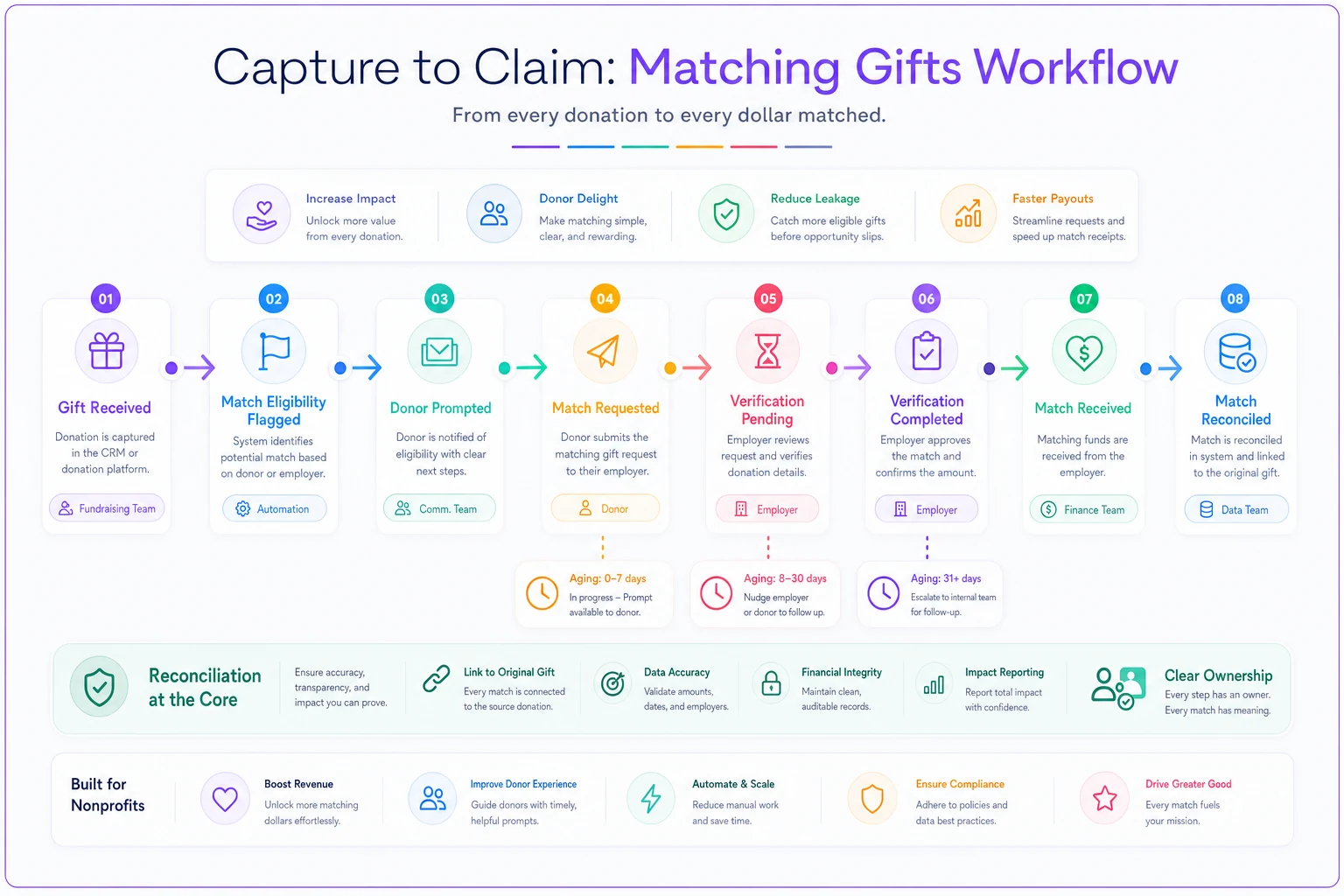
Gift Received → Match Eligibility Flagged → Donor Prompted → Match Requested → Verification Pending → Verification Completed → Match Received → Match Reconciled
-
Gift received — a donation comes in through any channel
online, check, event, payroll.
-
Match eligibility flagged — the gift is identified as potentially matchable, either by donor self‑report, employer lookup, or an eligibility tool.
-
Donor prompted — the donor is given the specific steps and links to submit their match request to their employer.
-
Match requested — the donor has submitted (or told you they submitted) the request through their employer.
-
Verification pending — the employer or their matching platform has reached out to confirm the original gift.
-
Verification completed — your team responded to and cleared the verification.
-
Match received — the matching funds have arrived.
-
Match reconciled — the match is recorded, linked to the original gift, and the loop is confirmed closed.
The states between 4 and 7 are where almost all the money hides. A gift that's been sitting in "match requested" for four months with no verification and no follow‑up is probably dead — but you'll never know unless something is tracking the age of each record in each state.
The workflow only works if two things are true. First, each gift carries the fields it needs to move between states. Second, someone or something is watching for gifts that have been sitting in one state too long. That second part is the reconciliation cadence, and it's the part most teams skip entirely.
Here's a visual overview of the capture‑to‑claim workflow.
The workflow only works if two things are true. First, each gift carries the fields it needs to move between states. Second, someone or something is watching for gifts that have been sitting in one state too long. That second part is the reconciliation cadence, and it's the part most teams skip entirely.
The CRM fields that make this trackable
You can't govern what you can't query. A matching program lives or dies on whether your CRM captures the right structured data at the right moments. The minimum viable field set looks like this:
| Field | Purpose | Common failure if missing |
|---|---|---|
| Employer name (standardized) | Match eligibility lookup and reporting | Free‑text variants make eligibility impossible to query |
| Match eligible (yes/no/unknown) | Segments who to prompt | Everyone gets prompted or no one does |
| Match status | Tracks the state in the workflow | Can't tell requested from received |
| Original gift ID (linked) | Ties match back to source gift | Match recorded as unrelated revenue |
| Expected match amount | Forecasting and reconciliation | No way to know what's outstanding |
| Match request date | Ages the pipeline | Can't spot stalled requests |
| Employer deadline | Prevents missed submission windows | Requests expire silently |
| Match received date & amount | Closes the loop | Loop never confirmed closed |
The employer name field is the one people underestimate. If "Google," "Google Inc," and "Google LLC" all live as free text, your eligibility matching is worthless and your reporting is a mess. Standardize it at entry or clean it on a schedule. This connects directly to broader data hygiene — if your donor records are already drifting, matching data will drift faster because it's lower priority. Getting a handle on employer standardization is part of the same discipline as any runnable nonprofit data governance framework that keeps fields consistent and queryable.
The employer name field is the one people underestimate. If "Google," "Google Inc," and "Google LLC" all live as free text, your eligibility matching is worthless and your reporting is a mess. Standardize it at entry or clean it on a schedule. This connects directly to broader data hygiene — if your donor records are already drifting, matching data will drift faster because it's lower priority. Getting a handle on employer standardization is part of the same discipline as any runnable nonprofit data governance framework that keeps fields consistent and queryable.
The weekly reconciliation cadence
This is the heartbeat of the whole thing, and it's genuinely simple. Once a week, the program owner runs a short set of queries and works the exceptions. Not monthly. Weekly — because employer verification windows are short and a gift that slips two weeks past a deadline is gone.
The weekly checklist:
-
Pull all gifts flagged match‑eligible in the last 7 days that haven't been prompted → send prompts.
-
Pull all "match requested" gifts older than 30 days with no verification → follow up with the donor.
-
Check the shared verification inbox / matching platform → respond to every pending employer verification.
-
Pull all "verification completed" gifts older than 90 days with no funds received → flag for follow‑up.
-
Reconcile any matching checks received this week → link to original gift, update status to received, then reconciled.
-
Update the running total
expected outstanding vs. received year‑to‑date.
Prioritize responding to employer verifications same‑week — those are the easiest, highest‑value recoveries.
The whole thing takes 30–60 minutes a week once the queries are saved. The reason it feels hard is that most teams try to do it "when there's time," which means never, which means it becomes a frantic annual cleanup instead of a steady drip of recovered dollars.
The single highest‑value line is responding to employer verifications same‑week. Those have hard deadlines set by the employer, not by you, and they're the easiest money to lose through pure inattention. A gift the donor already submitted, that the employer is actively trying to give you, dies because a verification email sat unread. That's the most preventable loss in the entire pipeline.
Where automation genuinely earns its place here is in the surfacing, not the judgment. Having a system automatically flag "these 12 gifts have been sitting in verification‑pending past 90 days" turns an hour of digging into a two‑minute review. AI‑assisted operational tools are well-suited to this kind of monitoring work — watching field states, aging records, pushing exceptions to a human who decides what to do. The decisions stay with the program owner. The tedious watching happens in the background.
Claim timelines: what "normal" actually looks like
A big reason teams give up on matching is they don't know what a normal timeline looks like, so a slow match feels like a lost one and they stop tracking. Here's a realistic sense of the calendar:
-
Donor submission
usually within 30–60 days of the gift, if prompted well. After 90 days, submission rates fall off sharply.
-
Employer verification request
often 1–3 months after the donor submits, depending on the employer's batch cycle.
-
Match payment
frequently a quarter or more after verification — many large employers pay on quarterly or even annual cycles.
The full loop from gift to matched dollars can easily run 6–9 months. That's normal. It also means a gift you captured in the spring might not close until late fall, which is exactly why annual‑only reconciliation fails — you're auditing a pipeline that's still in motion and mistaking in‑progress for lost.
Set your follow‑up triggers against realistic windows, not impatience. Following up at 30 days on a request is smart. Writing off a verified gift at 60 days because the check hasn't come is premature — employer payment cycles are just slow.
A real scenario
A regional environmental nonprofit with roughly $2.5M in annual budget had matching "handled" by a plugin on their donation page and nothing else. Their CRM showed maybe $4k in matched gifts a year, and everyone assumed that was just what they got.
When they assigned matching to a single annual‑giving coordinator and stood up a weekly cadence, the picture shifted within two quarters. The coordinator spent about 45 minutes a week working the queries. The first thing they found: a shared inbox full of months-old unanswered employer verifications — real gifts the donors had already submitted. Just answering those recovered a few thousand dollars nobody knew was pending.
Over the following year, matched revenue landed somewhere around $22k–$26k. Not because donors suddenly discovered matching, but because the loop finally closed on gifts that were already eligible. Prompt rate went up, verification response time dropped to same‑week, and the "received but never reconciled" category basically disappeared. No new marketing spend. Same donor base. The difference was entirely operational.
Reporting that leadership will actually use
If the only number you report is "matched dollars received," you're reporting a lagging metric that's 6–9 months behind the work. That makes it impossible to manage. A useful matching report separates the pipeline into what's in motion and what's closed.
The key numbers to track and report:
-
Eligible gifts identified (this period)
-
Match requests in progress (count and expected dollars)
-
Verifications pending your response (this is the leading indicator of leakage)
-
Matched dollars received (this period and YTD)
-
Estimated outstanding match (expected minus received)
-
Recovery rate (received ÷ estimated eligible)
The two numbers that predict future performance are verifications pending your response and estimated outstanding match. If verifications pending is creeping up, you're about to lose money. If outstanding match is large and healthy, you have real revenue in the pipe. Leadership can act on those. They can't act on a bare YTD total.
Keep the report to one page and send it monthly even though you reconcile weekly. Weekly is the operating cadence; monthly is the reporting cadence. Reporting weekly to leadership creates noise, and reconciling monthly creates leakage. Don't mix the two.
When a full program makes sense — and when it doesn't
This isn't universally worth the effort, and it's worth being honest about that.
When it makes sense:
-
You have a meaningful base of donors who work at large corporate employers — matching participation skews heavily toward big‑company employees.
-
Your gift volume is high enough that manual per‑gift tracking would be overwhelming.
-
You already have a CRM you can add fields and saved queries to.
When it's premature:
-
You're a tiny shop with a handful of gifts a month — a lightweight checklist and a good donation‑page prompt is plenty. Don't build governance for a pipeline that doesn't exist yet.
-
Your donor base is mostly individuals, retirees, or small‑business owners whose employers don't match. Check your actual employer data before investing.
-
Your CRM is such a mess that you can't reliably query employer or link gifts. Fix the data foundation first — matching governance built on dirty data just produces confident wrong numbers.
Who should not run this as a standalone push: organizations still fighting basic gift‑entry and reconciliation problems. Matching is a layer on top of clean gift processing. If your core recording is shaky, that instability propagates. The same discipline that lets you recover failed recurring donations without losing supporters — clear states, defined follow‑up triggers, an owner watching the pipeline — is the exact muscle matching gifts requires. Build it once and both programs benefit.
The system view
Matching gifts governance isn't really about matching gifts. It's about whether your organization can run a multi‑party, multi‑month workflow without losing track of it. That's a capability, and once you have it, it transfers.
The program owner gives you accountability. The capture‑to‑claim states give you visibility into where any gift is stuck. The CRM fields make everything queryable. The weekly cadence catches leaks before deadlines pass. The reporting tells leadership whether the machine is running. Pull any one of those out and the whole thing degrades — an owner with no cadence just feels guilty, a cadence with no fields has nothing to query, fields with no owner go stale.
Start smaller than you think you need to. Assign one owner, add the fields, save the six weekly queries, and run the cadence for one quarter before you optimize anything. Most of the money you're leaving on the table isn't lost to donor apathy — it's lost in the gap between "eligible" and "reconciled," and that gap closes the moment someone is actually watching it every week.
Start smaller than you think you need to. Assign one owner, add the fields, save the six weekly queries, and run the cadence for one quarter before you optimize anything. Most of the money you're leaving on the table isn't lost to donor apathy — it's lost in the gap between "eligible" and "reconciled," and that gap closes the moment someone is actually watching it every week.
Ready to elevate your nonprofit impact?
Join 2,000+ nonprofits using Almosly to boost fundraising efficiency, deepen donor relationships, and scale philanthropic impact.