


Most small nonprofits don't have a dashboard problem. They have a trust problem with their dashboards.
The pattern plays out constantly: a development director builds a decent-looking board deck with six charts, presents it, and then someone on the finance committee asks, "Wait, why does total revenue here not match what the treasurer reported last month?" The whole thing falls apart — not because the charts were wrong, exactly, but because nobody could explain where the number came from, which pull it was based on, or whether it included pledges, soft credits, and that $40k gift that cleared on the 31st or the 1st.
That gap — between "we have charts" and "the board believes our charts" — is what fundraising analytics governance actually comes down to. And you can close it without hiring a data analyst, without Snowflake, and without a six-figure BI implementation. You need a defensible process, a handful of KPIs everyone agrees on, and light checks that catch what breaks numbers before those numbers hit a slide.
Here's how that system works when a four-person shop runs it.
Why dashboards fall apart at small nonprofits (it's rarely the tool)
When dashboards feel unreliable, the instinct is to blame the software. "Our CRM reporting is bad." "We need Tableau." Sometimes that's true. Usually it's not the root cause.
What breaks is almost always upstream of the chart. A few recurring failure points:
-
- No single definition of "revenue." Finance counts cash received. Development counts commitments. Grants counts awarded. All three are legitimate, but if your dashboard blends them silently, every number is suspect.
-
- The data gets pulled differently each time. One month someone filters by gift date, the next by batch date, the next by fiscal period. The numbers move and nobody knows why.
-
- Manual copy-paste between the CRM export and the spreadsheet. This is where a large share of errors enter — a dragged formula that didn't extend to the last row, a pivot that silently dropped a campaign code.
-
- No clear owner. When something looks off, there's no one accountable for confirming it. So it either gets ignored or gets quietly "fixed" by whoever's panicking before the board meeting.
Across a lot of small development teams, the dashboard itself is often fine. The process feeding it is undocumented, inconsistent, and dependent on one person's memory. That's not an analytics problem — it's a governance problem. Which is actually good news, because governance is cheap compared to technology.
The minimal tech path: spreadsheet → validated spreadsheet → BI
You don't need to jump straight to a BI tool. Jumping there too early usually makes things worse, because you've automated a messy process and made the mess harder to spot.
Stop missing fundraising opportunities.
Almosly helps you plan, track, and optimize every campaign with ease.
- Centralized donor and volunteer management
- Automated engagement workflows
- Impact and fundraising analytics
No credit card required
| Stage | What it looks like | When you're ready to leave it |
|---|---|---|
| Stage 1 — Raw spreadsheet | Manual CRM export, pivot tables, charts built by hand each month | When you're spending more than a few hours a month rebuilding the same views, or numbers keep shifting |
| Stage 2 — Validated spreadsheet | Same export, but with a defined pull query, a validation tab, and a reconciliation check against finance before anyone sees it | When the monthly rebuild is stable and you want charts that refresh instead of being rebuilt |
| Stage 3 — Lightweight BI | A tool like Looker Studio, Power BI, or Metabase connected to a cleaned data source or a scheduled export | When definitions are locked, checks are automated, and you trust the inputs enough to stop reviewing them manually |
The mistake most teams make is skipping Stage 2. They go from messy spreadsheet straight to a BI dashboard and end up with a beautiful real-time chart built on an undefined, unvalidated data pull. It looks more trustworthy, which is genuinely dangerous — polish buys credibility the data hasn't earned.
Stage 2 is where the governance work actually lives. Unglamorous, yes. Also the difference between a dashboard that survives finance committee scrutiny and one that doesn't.
The six board‑grade KPIs (and why six)
Boards don't need twenty metrics. They need six they understand, that connect to real decisions, and that stay consistent quarter over quarter. More than that and the meeting turns into chart tourism.
-
1. Total revenue, by type. Split into one-time, recurring, major, grants — not one blended number. The split is what makes it useful. A flat total hides whether you're growing or just got one large gift.
-
2. Donor retention rate. Ideally split between new-donor retention and repeat-donor retention, because they behave completely differently and the board should see which one is leaking.
-
3. Recurring revenue (and net new recurring). Monthly recurring minus churned recurring. Your most predictable money, and the number most often buried in reports.
-
4. Cost to raise a dollar (or a rough version of it). Even a directional figure keeps the board grounded when someone pitches an expensive new channel.
-
5. Pipeline / committed-but-not-received. Pledges, grants in progress, major gifts in the "ask made" stage. This tells the board whether next quarter looks fine or ugly.
-
6. Donor acquisition count and source. How many new donors, from where. Thin on its own, powerful next to retention.
What's not on this list: email open rates, event attendance, social followers. Those are operational metrics that matter for your team's weekly work but don't belong on a board dashboard. Mixing them in trains the board to tune out.
One thing worth flagging on KPI #2 and #6: retention and acquisition by source only make sense if your attribution is solid. If you can't tell which channel or campaign a donor came from, acquisition-by-source becomes guesswork. If that layer is shaky, it's worth fixing before building dashboards around it — we walked through a practical approach to that in a campaign attribution framework for multi-channel nonprofits.
The lightweight ETL and validation layer (the part everyone skips)
ETL sounds like a big-data word. At this scale it means: pull the data the same way every time, check it before you trust it, and load it into the same place. You can do all of this in a spreadsheet.
Here's the validation logic that catches most real errors. Build these into a dedicated "checks" tab that turns red when something's off:
-
- Row count sanity check. Did this month's export have roughly the number of rows you'd expect? A pull that suddenly shows half the normal rows usually means a filter broke.
-
- Revenue reconciliation. Does total revenue in your pull match (within a tolerance) what finance has in their system? If development says $184k and finance says $171k, stop before that hits a slide and figure out the gap — usually timing, soft credits, or in-kind.
-
- Date-range check. Confirm every record actually falls inside the reporting period. A single stray date is how a prior-year gift sneaks into this quarter's total.
-
- Null/blank check on key fields. Any gifts with no campaign code, no fund, or no donor ID? Those will quietly break your by-source and by-type breakdowns.
-
- Duplicate check. Same donor, same amount, same date appearing twice — a classic double-import.
Keep your validation rules in a single checks tab with color-coded flags and a notes column so exceptions are visible and auditable.
A real example of why this matters: a mid-sized arts nonprofit had recurring revenue drifting up a few percent most months. Looked like growth. Turned out a batch of annual pledges was being counted as recurring because of how a field was mapped in the export. Not exactly a lie, but it was describing something different than the board thought. A field-logic check on the pull would have caught it in month one instead of month nine.
This validation layer is also where you settle what "counts." Does revenue include pledges or only received gifts? In-kind? Soft credits to spouses? Write it down once, bake it into the pull, and stop relitigating it monthly. The definitions are the governance.
A monthly audit checklist and clean handoffs
A dashboard is only trustworthy if the same steps happen every month, in the same order, by known people. This is where small teams win or lose — not in the tool, in the cadence.
A monthly process a two-to-four person shop can realistically run:
-
1. Pull (Day 1–2 after month close). Development ops runs the saved export with defined filters. No ad-hoc tweaks.
-
2. Validate. Run the checks tab. Every red flag gets resolved or explained in a notes field. Nothing moves forward with unexplained reds.
-
3. Reconcile with finance. Dev ops and finance compare the revenue total. Agree on the number or document the known difference — timing, in-kind — in one line.
-
4. Refresh the dashboard. Only after validation and reconciliation does the BI view or chart tab get updated.
-
5. Internal review. The development director looks at the six KPIs against expectations before the board sees them. "Does this story make sense?" is a real step, not a formality.
-
6. Package for board. The six KPIs plus two or three sentences of narrative per metric. Numbers without narrative get misread.
Handoff rules — who owns what — are what keep this from collapsing when someone's out:
-
- Development ops owns the pull and validation. They are the only person who changes the export logic, and any changes are logged.
-
- Finance owns the reconciliation sign-off. They don't build the dashboard, but they confirm the revenue number ties out.
-
- The development director owns the narrative and board-facing interpretation.
-
- Any change to a KPI definition requires sign-off from both dev leadership and finance. This single rule prevents the slow, invisible drift that destroys trust over time.
A visual of the monthly audit workflow:
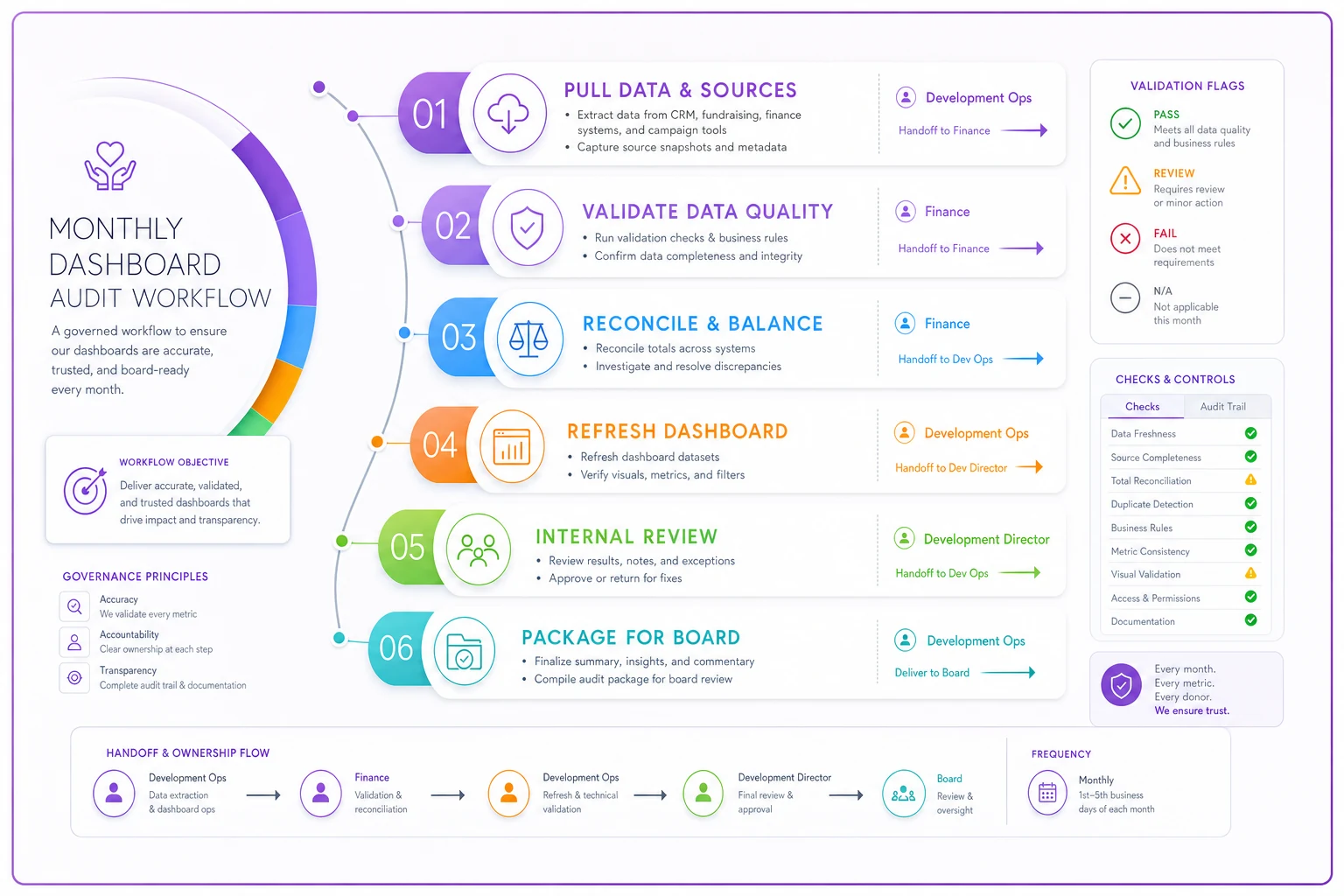
The reconciliation handoff is the one teams most often skip and most need. When finance and development agree on the number before the board meeting, you've eliminated the single most damaging dashboard moment — the public mismatch that makes everyone question all your data at once.
Where operational software quietly makes this easier
You can run everything above by hand, and plenty of good shops do. But the manual steps — the export, the copy-paste, the validation checks — are exactly where human error creeps in and where one person becomes a single point of failure.
Modern operational platforms with AI-assisted automation earn their keep here, not as a flashy dashboard replacement, but as the boring connective tissue. A platform that runs the same scheduled pull each month, applies your validation rules automatically, flags null fields and duplicates before a human touches the data, and keeps a log of what changed — that removes the two things that reliably break small-team analytics: inconsistency and memory dependence. The checks that used to live in one staffer's head become a repeatable, documented process the whole team can see and verify.
The point isn't to automate judgment. Your development director still interprets the story. It's to automate the mechanical, error-prone middle so a trustworthy number arrives reliably, and nobody's rebuilding a validation tab from scratch at 11pm before a board meeting. If you're already thinking about how to turn donor data into something boards actually use, it connects naturally to building a real measurement process — which we covered in an operational impact-measurement process nonprofits can actually run.
When this makes sense — and when it doesn't
This full approach makes sense when you're reporting to a board quarterly, you've had at least one "why don't these numbers match" moment, and you have someone who can own the pull even part-time. Most organizations in the roughly $500k–$10M range sit squarely here.
This is overkill when you're a volunteer-run org raising under a couple hundred thousand a year with one revenue type. A clean spreadsheet and a reconciliation check with your treasurer is genuinely enough. Don't build governance you don't need yet.
Who should not jump to BI yet: anyone whose KPI definitions still shift month to month. If you can't agree on what "revenue" means, a BI tool will just render your disagreement in nicer colors. Lock definitions first. Automate second.
A short real scenario
A regional environmental nonprofit, about $2.1M in annual revenue, four-person development team, no analyst. Their board deck was rebuilt from scratch every quarter in a spreadsheet, and finance and development numbers rarely tied out on the first pass — usually off by somewhere in the $8k–$15k range, almost always timing and in-kind differences that took hours to chase down live.
They didn't buy a BI platform first. They spent about a month in Stage 2: defined a single saved export, wrote down what revenue did and didn't include, built a checks tab with row-count, date, null, and reconciliation flags, and set a rule that finance signed off on the total before anything went to the board.
The visible change wasn't dramatic in a demo-worthy way. Board prep dropped from a multi-day scramble to a predictable half-day. The revenue mismatch stopped being a surprise in the meeting because it was caught and explained in step three. And — the part that actually mattered — the finance committee stopped questioning the development numbers, because they'd already seen them reconcile. Six months later they moved the locked, validated data into a simple BI dashboard, and because the inputs were already trustworthy, the transition was almost boring. Which is exactly what you want.
Board-grade dashboards aren't a technology milestone. They're a discipline milestone. The organizations whose boards trust their numbers aren't the ones with the fanciest tools — they're the ones pulling data the same way every month, checking it before anyone sees it, reconciling with finance, and agreeing on what every number means before it lands in a chart.
Get the definitions, the validation, and the handoffs right while you're still in a spreadsheet, and the move to BI becomes a quiet upgrade rather than a risky leap. Skip that work and no dashboard tool on earth will make your board believe you. Start with trust. The charts are the easy part.
Ready to elevate your nonprofit impact?
Join 2,000+ nonprofits using Almosly to boost fundraising efficiency, deepen donor relationships, and scale philanthropic impact.