

Most nonprofit teams walk out of a conference, gala, or community expo with a stack of scanned badges and a vague intention to "follow up soon." Three weeks later the list is still sitting in a spreadsheet, half the emails bounce, nobody remembers which attendees actually cared, and the one person who was ready to give monthly got a generic "thanks for stopping by" email forty days too late.
The gap isn't effort. Badge data gets captured without the fields you need to act on it, imported without rules that protect your CRM, and followed up on without a timed sequence that moves someone from "I talked to them at a booth" to "they set up a $25/month gift." This piece walks through exactly how to run that pipeline — the specific fields, import rules, follow-up timing, and finance checks a small team can actually maintain.
Staying narrow on purpose here. This is only about converting event attendees into first recurring donors. Not general acquisition. Not lapsed reactivation. Just the path from scan to first monthly gift.
Why most event follow-up quietly fails
The failure almost always starts at the scan itself. A badge scanner spits out name, title, organization, and email. That's it. No indication of what the person talked about, whether they asked a real question or just wanted a tote bag, no consent flag for email contact. The data is technically "captured" but operationally useless for segmentation.
Then comes the import. Someone dumps 280 rows into the CRM a week later, creates 60 duplicate contacts, overwrites existing donors' job titles with stale conference data, and tags everyone with the same "Event 2026" label. Now your clean database has a layer of noise sitting on top of it, and people who already give to you just got reclassified as cold leads.
The last failure is timing. Even teams that import cleanly tend to send one follow-up — usually a week or two out — and then nothing. No structured sequence, so warm attendees cool off and the moment passes. Conversion from a cold event list into recurring giving is a decay curve. Every week you wait, response rate drops.
Teams who actually convert event attendees aren't sending better emails. They're capturing better data at the table and running a disciplined sequence afterward. The copy matters far less than the pipeline.
The 5-step pipeline at a glance
The table below is a quick reference for the whole pipeline before we get into each step. Worth bookmarking if you're building this out for your team.
Stop missing fundraising opportunities.
Almosly helps you plan, track, and optimize every campaign with ease.
- Centralized donor and volunteer management
- Automated engagement workflows
- Impact and fundraising analytics
No credit card required
| Step | What happens | Owner | Timing |
|---|---|---|---|
| 1. Capture | Badge scan + 4 custom fields logged at the booth | Booth staff | Live, during event |
| 2. Triage & import | De-dupe, tag, consent-check before anything touches the CRM | Ops/data lead | Within 48 hrs |
| 3. Timed sequence | 7-day welcome, 21-day value, 60-day first recurring ask | Fundraising lead | Days 7 / 21 / 60 |
| 4. Recurring ask handling | Route responders, process first monthly gift | Gift processor | On response |
| 5. Finance reconciliation | Match gifts to source event, confirm recurring setup | Finance | Weekly + 90-day |
Each step builds directly on the one before it. Skip or rush any of them and the whole thing leaks. The rest of this article breaks each one down with the actual fields and rules you need to make it work.
Step 1: What to capture at badge-scan (and what to ignore)
The scanner gives you contact data. Your job at the booth is to add the four things the scanner can't: context, interest level, consent, and a follow-up owner. If booth staff capture these four in the moment, everything downstream gets easier — segmentation, personalization, timing. If they don't, you're back to blasting a generic email to 300 people and hoping.
-
Standard contact block — name, email, organization, title (from the scan itself)
-
Conversation topic — a short dropdown, not a free-text essay. Options like: Program interest, Volunteering, Wants to donate, Just browsing, Partnership/vendor. One tap.
-
Warmth flag — a simple 1–3. 1 = polite grab-and-go, 2 = real conversation, 3 = explicitly asked how to give or get involved.
-
Email consent — did they verbally agree to hear from you? Yes/No. This single field saves you from compliance headaches and protects your sender reputation later.
-
Captured by — which staff member scanned them, so follow-up can reference a real conversation.
The warmth flag is the single most predictive field you'll collect, and it costs two seconds per scan. A list of 300 scans where 40 are marked "3" lets you prioritize instead of blasting everyone identically. In practice, the warmth-3 group often converts at several times the rate of everyone else — treating them the same as someone who grabbed a tote bag wastes your best leads.
Give booth staff a single-tap dropdown for conversation topic and a one-tap warmth flag to keep capture fast and consistent.
What not to capture: skip phone numbers unless someone volunteers one, skip detailed notes you'll never actually read, and don't try to guess giving capacity at the booth. Log just enough to triage and personalize, nothing more.
Step 2: Safe batch-import rules
This is where small teams do the most damage to an otherwise clean database. The scanned export is messy by nature — inconsistent capitalization, people already in your CRM, typo'd emails, corporate catch-all addresses. Dumping it straight in creates the exact duplicate-and-overwrite mess that takes weeks to untangle. If you've ever dealt with the aftermath, our stepwise donor data cleanup approach covers the cleanup side. The goal here is to never create the mess in the first place.
-
Stage first, never import directly. Load the raw export into a staging sheet or import preview. Treat the CRM as off-limits until the file is clean.
-
De-dupe against existing records by email. Flag any email already in your system. Existing contacts should be appended to, not recreated — add the event tag and conversation topic, but never overwrite their title, address, or donor status with conference data.
-
Drop or quarantine bad emails. Obvious typos, catch-all addresses (info@, contact@), and blanks go into a quarantine tab, not the import.
-
Enforce the consent field. Anyone marked "no" on email consent does not get added to the email sequence — full stop. They can be logged as a contact without being enrolled in outreach.
-
Standardize the event tag. One canonical tag per event (e.g.,
evt-spring-expo-2026), applied consistently. No variations, no free-text. -
Set the source field. Every new record gets its acquisition source set to the event. This is what makes Step 5's reconciliation possible.
A typical result looks something like this: a team scans 310 badges, and after staging they find 48 already in the CRM, 22 bad emails, and 31 people who didn't consent to email. That leaves roughly 200 clean, enrollable new contacts — a much more honest number than "310 leads," and one that won't poison your database or tank deliverability.
If you only adopt one habit from this entire pipeline, make it the staging step. The difference between teams with clean CRMs and teams drowning in duplicates is almost entirely whether they import through a staging layer or straight into production.
Step 3: The timed 7 / 21 / 60-day sequence
Three touches, spaced deliberately, each with a different job. The spacing matters as much as the content — too fast feels aggressive, too slow lets the event fade from memory entirely.
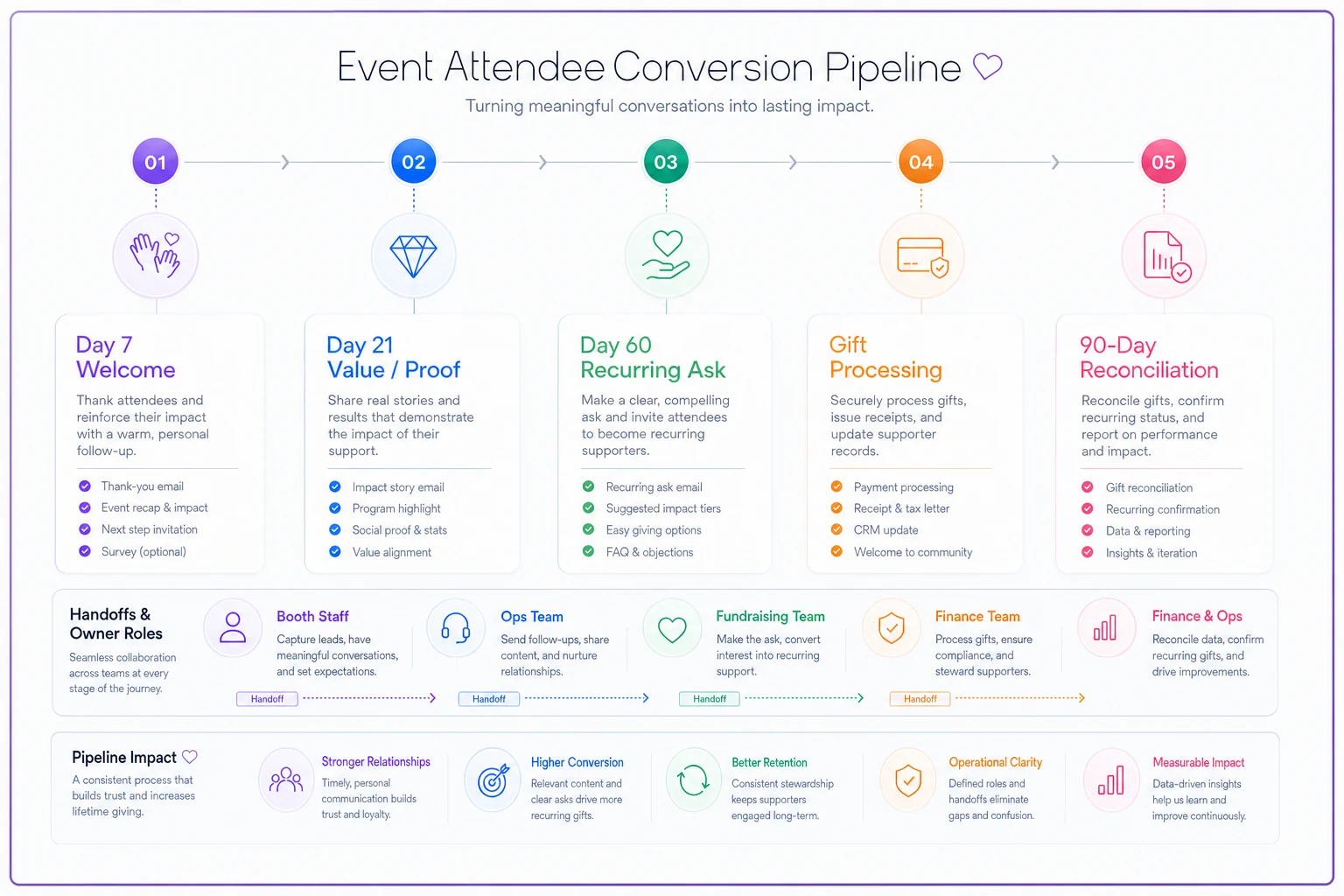
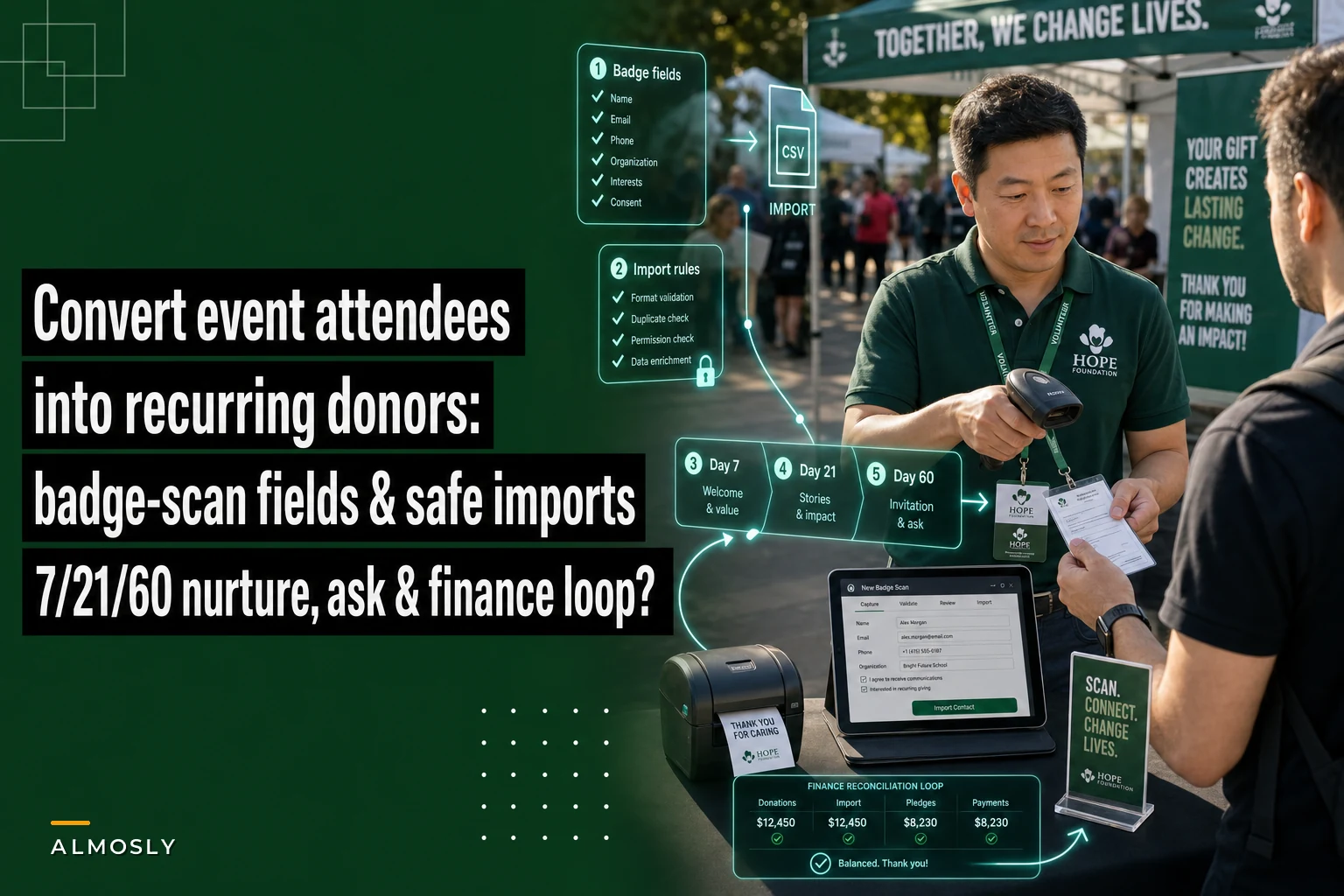
Here's a quick visual that maps the timing and handoffs so your team can follow the sequence without guessing.
Day 7 — Welcome and context. Not an ask. This email references the event and, where possible, the conversation topic they were tagged with. Someone tagged "Program interest" gets a short note about that program. Someone tagged "Volunteering" gets a different one. The warmth-3 group can get a slightly more personal note from the staff member who scanned them. The only goal of day 7 is to confirm you're a real, engaged organization and get an open or click.
Day 21 — Value and proof. A storytelling touch. One concrete outcome — what the organization actually did, who it helped, with real specifics. No ask yet. You're building the case that recurring support means something tangible. This is also where you can link to deeper impact content if they want it. The goal is to move them emotionally closer to giving, not to pitch.
Day 60 — The first recurring ask. Now you ask, and you ask specifically for monthly giving, not a one-time gift. Lead with a low, concrete monthly amount ("$15/month keeps one kid in the after-school program all year") rather than an open-ended donation form. The reason for monthly-first framing: converting an event contact directly to recurring is far more efficient than converting them to a one-time gift and then trying to upgrade them later. You skip an entire conversion step.
-
Warmth flags change the timing, not just the copy. Warmth-3 contacts can have their recurring ask pulled forward to around day 30 — they already signaled intent, and making a hot lead wait 60 days is a common, costly mistake.
-
Stop the sequence on response. Anyone who replies or gives moves out of the automated sequence immediately and into human handling. Nothing feels worse to a new donor than getting an automated "will you give?" email three days after they already set up a monthly gift.
-
Don't add more emails out of panic. If someone hasn't engaged by day 60, let them settle into your regular list. Hammering non-responders damages deliverability for the whole file.
This sequence is deliberately short. Small teams can't maintain twelve-email nurture tracks per event, and they don't need to. Three well-timed, well-segmented touches outperform a sprawling sequence nobody has bandwidth to maintain.
Step 4: Handling the first recurring gift cleanly
When someone converts, the handoff from "email responder" to "set-up recurring donor" is where small teams fumble. The person clicks the monthly giving link, sets up $20/month, and then nothing is recorded about where they came from — so three months later nobody knows this monthly donor started at the spring expo.
Make sure the recurring setup carries the source through. The gift record needs the event source tag attached at the moment the recurring profile is created, not reconstructed later from memory. Then the new recurring donor should exit the acquisition pipeline and enter your standard welcome and retention flow.
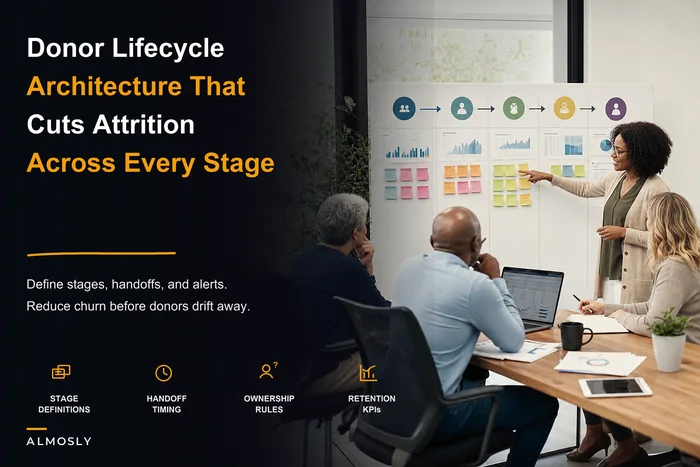
How you steward them from here determines whether that $20/month survives past the third charge, and the mechanics of that long-term relationship are worth treating as their own discipline — the donor lifecycle architecture that cuts attrition picks up exactly where this pipeline ends.
One thing worth watching: first recurring gifts from colder event leads have a higher early-failure rate than gifts from warm existing donors. Expect a few cards to decline on the second charge. Build that expectation into your process so a slight drop between month one and month two doesn't catch anyone off guard.
Step 5: Finance reconciliation checklist for small teams
The last step is the one almost always skipped, and it's why so many teams genuinely can't answer "did that event make money?" You scanned badges, ran a sequence, got some monthly donors — but unless finance ties those gifts back to the event source, the whole effort stays invisible on the books.
-
Match new recurring gifts to the event source tag. Pull all recurring profiles created since the event and confirm each has the correct source tag. Fix any that are missing it.
-
Confirm recurring is actually recurring. Verify that each "monthly" gift is set up as a true recurring profile, not a one-time gift someone hand-keyed. This error is more common than it should be.
-
Reconcile count vs. CRM vs. processor. The number of new monthly donors in your CRM should match the number of new recurring profiles in your payment processor. Gaps mean a gift didn't post or a profile didn't save.
-
Track the real conversion funnel. Scans captured → clean enrolled → responders → first recurring → still active at day 90. That last number is the one that matters.
-
Calculate cost per recurring donor. Booth cost, travel, materials, staff time divided by net new active monthly donors. This is the number your board actually wants.
A realistic picture from this kind of pipeline: 310 scans, roughly 200 enrolled after triage, maybe 12–18 first recurring gifts set up, and somewhere around 10–14 still active at 90 days. If the event cost around $4k all-in, that's a few hundred dollars per retained monthly donor. That looks expensive on a spreadsheet until you remember that a retained monthly donor is worth far more than their first gift across the life of the relationship.
When this pipeline is worth it — and when it isn't
It makes sense when you're attending events where you collect at least a few dozen badge scans and you have someone who can own the import and sequence. The pipeline pays off on volume and repetition — run it at every event and the per-event setup cost largely disappears.
It's a bad idea when you only do one small event a year with 20 scans. The overhead of staging, tagging, and sequence-building isn't worth it for a list that small — just follow up personally and move on.
Who should not run this as-is: teams with no consent discipline. If your booth staff won't reliably capture the email-consent field, fix that first. Running a batch import and automated sequence on contacts who never agreed to hear from you is both a deliverability risk and a trust problem, and no amount of good timing compensates for it.
A note on tooling without overcomplicating it
You can run every step of this manually with a staging spreadsheet, a de-dupe check, and a scheduled email sequence in whatever CRM you already have. The pipeline is the point, not the software.
Where AI-powered operational platforms genuinely help is in removing the repetitive handoffs — staging imports with duplicate detection before records go live, auto-tagging event sources, triggering the 7/21/60 timing without someone remembering to hit send, and flagging gifts missing a source tag during reconciliation. If you're running events frequently, automating those connective steps frees your small team to focus on the warmth-3 conversations that actually convert, instead of babysitting spreadsheets. Adopt the discipline first, though. Let the tooling catch up to a process that already works.
Event attendee conversion isn't a copywriting challenge — it's a data-capture and sequencing challenge. Capture four extra fields at the badge scan, stage and de-dupe before anything touches your CRM, run three timed touches that end in a recurring ask, and reconcile the gifts back to the event so you actually know what worked. Do that consistently and the stack of badges stops being a pile of good intentions and starts producing monthly donors you can count on the books.
Ready to elevate your nonprofit impact?
Join 2,000+ nonprofits using Almosly to boost fundraising efficiency, deepen donor relationships, and scale philanthropic impact.