


Most of the money left on the table in matching gifts doesn't disappear because donors won't participate. It disappears in the gap between "donor mentions their employer matches" and "the match actually lands in your bank account." That gap is where the workflow breaks — usually silently, usually for months, until someone finally runs the numbers and realizes a big chunk of expected match revenue never arrived.
This is a workflow problem, not a fundraising problem. The donor already said yes. The employer already has a program. What's missing is the boring operational plumbing: the exact fields you capture, the checkpoints where a match either advances or stalls, and the weekly habit of reconciling what you expected against what actually cleared.
Here's how the matching gifts process actually falls apart — and a concrete system a two- or three-person shop can run without a dedicated matching-gifts coordinator.
Where the money actually leaks
Nobody tells you this when you sign up for a matching-gift database tool: the tool tells donors their company matches. It does not close the loop. Closing the loop is on you.
A typical failure looks like this. A donor gives $500 online during your year-end campaign. The confirmation page shows a matching-gift search widget. The donor searches, sees their employer, maybe even clicks through to their employer's portal. Then nothing — nothing tracked on your side. You don't know if they submitted the match request. The employer's platform (Benevity, YourCause, whatever) processes it 60–90 days later, batches it with dozens of other nonprofits, and sends a lump-sum ACH with a remittance file that lists donor names in a format that doesn't cleanly match your CRM.
-
The person who ran the campaign has moved on to the next one
-
Nobody remembers which donors said they'd request a match
-
The lump-sum deposit gets coded as "general revenue" or "other" because reconciling it line-by-line is annoying
So the match technically arrived, but you never attributed it to the original gift, never thanked the donor for doubling their impact, and have no idea what your true match capture rate is. Multiply that across a year and a mid-sized shop can easily lose track of somewhere between $8k and $20k in matches — some genuinely unclaimed, some claimed but invisible in your books.
The invisible ones are almost worse. If matched revenue is buried inside "general," you'll never know whether your capture rate is 20% or 60%, and you have nothing to improve against.
The core problem: you're treating a match like an event, not a record
The mistake underneath almost every leak is treating a match as a one-time moment ("donor searched the widget!") instead of a record with a lifecycle.
Stop missing fundraising opportunities.
Almosly helps you plan, track, and optimize every campaign with ease.
- Centralized donor and volunteer management
- Automated engagement workflows
- Impact and fundraising analytics
No credit card required
A match has stages. It gets identified, then requested by the donor, then approved by the employer, then paid, then reconciled to the original gift. Each of those is a distinct state, and each transition is a place where the process can stall for weeks. If your CRM only captures "eligible: yes/no," you have no way to see where a specific match is stuck, and no way to trigger the right follow-up at the right moment.
The fix starts with structuring the record properly. Everything else — automation, reconciliation, uplift reporting — depends on having clean fields underneath.
The exact CRM fields to capture
You don't need a custom object for this in most CRMs, though you can build one if your platform supports it. At minimum you want these fields attached to the gift (or to a linked "matching gift" record if your system allows a parent-gift relationship):
| Field | Type | Why it exists |
|---|---|---|
Match_Eligible | Yes / No / Unknown | "Filters who to follow up with. \"Unknown\" matters — don't collapse it into \"No.\"" |
Employer_Name | Text (standardized) | Needed to group by company and check program rules. Standardize spelling. |
Match_Ratio | Picklist (1:1, 2:1, 0.5:1) | Drives your expected match amount. |
OriginalGiftID | Link/lookup | The anchor. Every match must point back to a real gift. |
ExpectedMatchAmount | Currency | Original gift × ratio. This is what you reconcile against. |
Match_Status | Picklist (see stages below) | The single most important field. |
Match_Portal | Picklist (Benevity, YourCause, Direct, etc.) | Determines how the money will arrive and how to reconcile it. |
DonorSubmittedDate | Date | When the donor filed the request. Starts the aging clock. |
MatchReceivedDate | Date | When money cleared. Blank = still outstanding. |
MatchReceivedAmount | Currency | Actual, not expected. The variance is your data-quality signal. |
The Match_Status picklist is where the workflow lives. Keep it to a small, honest set of states:
-
Identified – eligible, donor hasn't confirmed submission
-
Submitted – donor says they've filed the request
-
Pending Employer – filed, awaiting employer/platform approval
-
Paid – money received
-
Reconciled – matched to original gift and coded correctly
-
Lapsed – deadline passed, no longer claimable
That "Lapsed" state matters more than people expect. Most corporate programs have submission deadlines — often the end of the calendar year, sometimes a fixed number of months after the gift. If you don't track deadlines, matches quietly age out and you never know they were even possible.
One field people consistently forget: capture the employer submission deadline when you know it, or at least a default (Dec 31 of the gift year is a safe assumption for many programs). Without it, your follow-up timing is guesswork.
Automation checkpoints (where to let the system carry the load)
Once the fields are clean, you can put a few lightweight checkpoints in place so matches move through stages without someone babysitting a spreadsheet. This is where operational software with AI automation earns its keep — not by doing anything fancy, but by watching the aging clock and flagging stalls a human would forget.
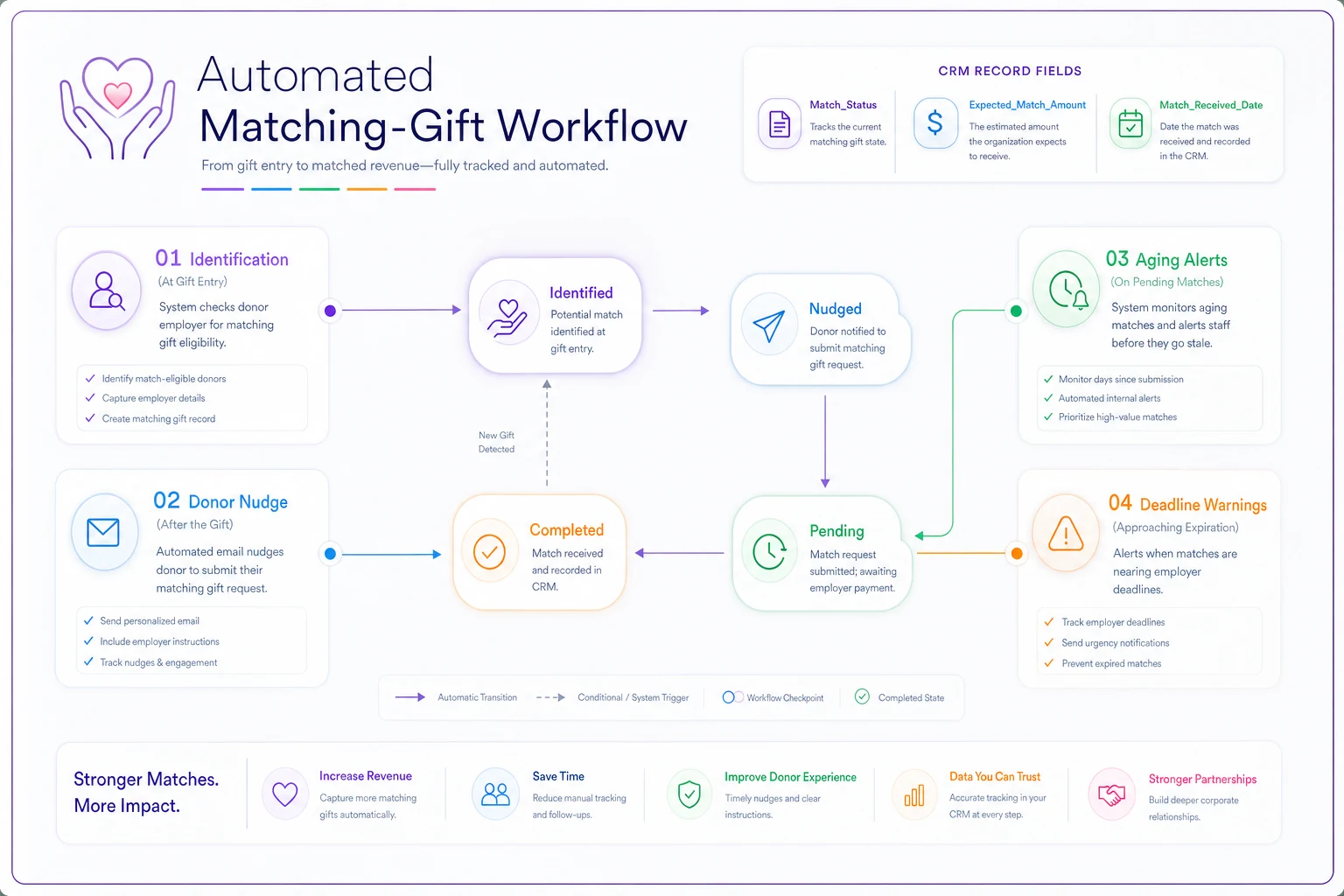
Think of it as four checkpoints, not a big system:
Checkpoint 1 — Identification at gift entry.
When a gift comes in, the workflow checks the employer field against a match-eligibility list and sets MatchEligible and MatchRatio. If the employer is unknown or blank, it flags the gift for a quick human review rather than defaulting to "No." The failure mode you're avoiding: eligible gifts silently coded ineligible because nobody looked up the company.
Checkpoint 2 — Donor nudge after the gift.
For any gift marked Identified, an automated sequence reminds the donor to submit their match request — with a direct link to their employer's portal if you have it. Timing matters: a nudge 3–5 days after the gift, then again around day 20 if Match_Status is still Identified, catches most people while the gift is fresh. If you already run donor communication sequences, this slots in alongside them; just be careful not to over-message. The same governance you'd apply to any donor-first recovery workflow applies here — respect suppression rules and don't stack this on top of five other emails going out that week.
Checkpoint 3 — Aging alerts on pending matches.
Any match sitting in Submitted or Pending Employer past around 75 days gets flagged. Sometimes the donor never actually filed; sometimes the employer's platform is just slow. Either way, a human should look. Automation's job here is simply to surface the stall, not resolve it.
Checkpoint 4 — Deadline warnings.
Matches approaching their employer submission deadline — say, 30 days out — that are still in Identified trigger a final, direct donor reminder. This is your last chance to prevent a Lapsed outcome.
The point of automation here isn't to replace judgment. It's to make sure the aging clock never gets ignored — because in a small shop, it always gets ignored once the campaign ends and everyone's attention moves on.
The weekly reconciliation checklist
Automation moves matches through the pipeline. Reconciliation is where you catch what automation can't — mismatched remittance files, partial payments, and misattributed deposits. Do this weekly, not monthly. Monthly is too long; the remittance files pile up and reconstructing them becomes its own project.
-
Pull all matches in
Paidstatus not yet markedReconciled -
Match each incoming ACH/check remittance line to an
OriginalGiftID -
Compare
MatchReceivedAmounttoExpectedMatchAmount; log any variance over a small threshold (say $25) for review -
Move fully reconciled matches to
Reconciledand confirm they're coded to the right campaign/fund -
Review everything in
Submitted/Pending Employerolder than 75 days → decide: nudge, wait, or markLapsed -
Review matches within 30 days of their submission deadline → trigger final donor outreach
-
Spot-check 3–5 recently entered gifts for correct
Match_Eligiblecoding -
Send match-acknowledgment thank-yous for anything newly
Reconciled
Keep the reconciliation block at the same time each week so it becomes a protected habit and you avoid catch-up backlog.
That last step gets skipped constantly, and it's a mistake. A donor who learns their $500 became $1,000 because their employer matched is one of your warmest re-solicitation prospects next year. Silence wastes that relationship.
One reconciliation nuance worth flagging: platform lump sums almost never map one-to-one to your expectations. A Benevity deposit might cover eight donors, three of whom you tracked and five you didn't. Those five are pure discovery — donors who requested matches you never captured at Checkpoint 1. Track them retroactively. They tell you exactly where your identification step is leaking.
Measuring uplift (so this isn't just busywork)
If you're going to run all this, you need to know it's working. Two numbers do the job.
Match capture rate = matches Reconciled ÷ matches Identified. If you identify 200 eligible gifts and reconcile 70, you're at 35%. Most small shops that start tracking honestly discover they're lower than they assumed — often in the 20–30% range — which is actually good news, because it means there's real room to grow.
Match uplift = total reconciled match dollars ÷ total matched-gift original dollars. This tells your board, in one clean figure, how much every "matchable" dollar is really worth. If donors who could match gave $60k in original gifts and you reconciled $22k in matches, your uplift on that segment is about 37%.
Track both quarter over quarter. The capture rate tells you whether your process is improving; the uplift tells your board why the process matters. Keep the definitions written down so a year from now nobody's arguing about whether "identified" included the "unknown" employers.
A real scenario
A regional literacy nonprofit — three-person development team, roughly $1.4M annual — had a matching-gift widget on their donation page for two years and assumed it was "handled." When they finally structured the fields and ran a reconciliation on the prior year, they found about 180 gifts flagged eligible, but only around 40 with any matched revenue attributed. Their real capture rate was closer to 22%.
They didn't add staff. They added the six-state Match_Status field, two donor nudges tied to gift date, and a standing 40-minute Friday reconciliation block. Over the next two quarters, capture climbed to roughly 45%, and they surfaced about $11k in matches that had actually been paid in prior periods but coded as general revenue — money already in the building that nobody had connected to donors. The thank-you step on those turned into three lead gifts the following year.
Nothing about that is exotic. It's just the difference between treating matches as an event versus a tracked record.
When this is worth building — and when it isn't
This full workflow makes sense if you're processing enough eligible gifts that manual tracking breaks down — practically, that's when you're seeing more than a handful of matchable gifts a month, or when a meaningful share of your donor base works at large employers with formal programs.
It's probably overkill if you run a handful of major gifts a year from a known donor circle. In that case a simple checklist per gift is plenty, and building out status picklists is ceremony you don't need.
And be honest about timing. If you're mid-migration or your gift data itself is messy, fix that foundation first. Structured match tracking on top of unreliable gift records just gives you cleaner-looking wrong answers. If a CRM move is on your horizon, sort the migration groundwork before layering this on — carry these fields into the new system deliberately rather than rebuilding them after the fact.
The one habit that holds it all together
The weekly reconciliation block is the load-bearing piece. Fields and automation set the stage, but matches leak in the gap between "paid" and "attributed," and only a recurring human review closes that gap reliably.
Put it on the calendar as a standing 40 minutes. Protect it the way you'd protect a donor meeting. Do that consistently for two quarters and you'll stop wondering whether you're leaving matching-gift money on the table — because you'll finally be able to see exactly how much you're catching, and where the rest is getting stuck.
Put it on the calendar as a standing 40 minutes. Protect it the way you'd protect a donor meeting. Do that consistently for two quarters and you'll stop wondering whether you're leaving matching-gift money on the table — because you'll finally be able to see exactly how much you're catching, and where the rest is getting stuck.
Ready to elevate your nonprofit impact?
Join 2,000+ nonprofits using Almosly to boost fundraising efficiency, deepen donor relationships, and scale philanthropic impact.