


Most annual giving teams don't fail at vendor selection because they picked a bad platform. They fail because nobody translated their actual reporting requirements into module-level specs before the demos started. The vendor drives the conversation, the slide deck looks great, and six months later you find out attribution is "coming in Q3," suppression lives in three disconnected places, and donor lifetime value is a manual spreadsheet someone rebuilds every board meeting.
This brief fixes that sequencing problem. It gives you a requirement-to-module map, a must-have checklist per module, the KPIs you should expect on day one (with formulas you can hand to a vendor and say "show me this running"), and a QA playbook to validate everything in a sandbox before you sign off on production.
If you've already read our campaign attribution framework, think of this as the procurement companion: that post tells you how attribution should work, this one tells you which boxes on the RFP make it possible.
Start with the three requirements, not the product list
Vendors sell by feature. You should buy by requirement. For annual giving, three requirements quietly determine whether your whole stack works:
-
Campaign-level attribution — you can say which campaign, channel, and touch produced a gift, consistently, across direct mail, email, events, and peer-to-peer.
-
Suppression & consent governance — a donor who asked for no mail, no calls, or deletion is actually suppressed everywhere, every send, with an audit trail.
-
Donor LTV reporting — you can produce lifetime value by segment, cohort, and acquisition channel without a data analyst rebuilding it from scratch.
Everything in the module map below exists to serve one or more of these. If a module doesn't contribute to at least one of them, it's a nice-to-have — treat it that way in negotiations.
The module-to-requirement matrix
An uncomfortable pattern across a lot of stacks: teams buy a CRM and assume it covers attribution, suppression, and LTV. It usually covers maybe 60% of one of them. The gaps get filled by spreadsheets and tribal knowledge.
Stop missing fundraising opportunities.
Almosly helps you plan, track, and optimize every campaign with ease.
- Centralized donor and volunteer management
- Automated engagement workflows
- Impact and fundraising analytics
No credit card required
| Module | Campaign Attribution | Suppression / Consent | Donor LTV |
|---|---|---|---|
| CRM | Stores campaign/appeal codes on gifts | Stores consent flags, do-not-contact | Stores gift history (raw material for LTV) |
| CDP | Unifies touch data across channels | Centralizes consent as single source of truth | Builds unified donor profile for cohorting |
| Attribution Engine | Core owner — applies rules, assigns credit | — | Feeds channel-level value back into LTV |
| Suppression / Consent Manager | — | Core owner — enforces suppression at send time | — |
| ETL / iPaaS | Moves touch + gift data between systems | Syncs consent changes everywhere, fast | Assembles gift + cost data for LTV calcs |
| Payment / Gift Processor | Passes campaign metadata with each gift | Honors recurring-stop / refund consent | Source of truth for net revenue |
| BI / Reporting | Displays attributed revenue by campaign | Reports suppression compliance rates | Renders LTV dashboards & cohorts |
| Predictive Analytics | Informs channel weighting | Flags consent-risk segments | Projects future LTV, not just historical |
Two things worth calling out. First, the Attribution Engine and the Suppression Manager are often not standalone products — they're capabilities bolted onto a CRM or CDP. That's fine, as long as you verify the capability actually meets the checklist below rather than taking "yes we do attribution" at face value. Second, the ETL/iPaaS layer is the one everyone underbudgets. It's invisible in demos and it's where most of your real integration pain lives.
Per-module must-have feature checklists
Hand these to vendors line by line. The useful ones answer directly. The ones that hedge are telling you exactly where the gaps are.
CRM
-
[ ] Campaign, appeal, and package/segment codes as structured fields (not free-text)
-
[ ] Multiple campaign codes per gift (soft credits, matched gifts, multi-touch)
-
[ ] Consent/do-not-contact flags at the channel level (mail, email, phone, SMS separately)
-
[ ] Full gift history retained after donor record merges
-
[ ] Record-level audit log (who changed what, when)
-
[ ] API read/write access to gift and consent objects
CDP (Customer / Constituent Data Platform)
-
[ ] Deterministic identity resolution (email + external ID), not just fuzzy matching
-
[ ] Single source of truth for consent that downstream systems can query
-
[ ] Event/touch ingestion from email, ads, web, events, P2P
-
[ ] Profile-level unification that survives channel switching
-
[ ] Segment export back to execution tools with consent attached
Attribution Engine
-
[ ] Configurable attribution models (first-touch, last-touch, linear, time-decay)
-
[ ] Per-campaign attribution window configuration (e.g., 7-day email, 90-day mail)
-
[ ] Ability to view the same gift under multiple models side by side
-
[ ] Deduplication of touches so one email open isn't counted five times
-
[ ] Attribution results exportable to BI with the underlying touch trail
Suppression / Consent Manager
-
[ ] Suppression enforced at send time, not just at list-build time
-
[ ] Global suppression that propagates to every channel within minutes
-
[ ] Reason codes on every suppression (opt-out, bounce, deceased, request)
-
[ ] Immutable audit trail for compliance/breach response
-
[ ] API + webhook so an opt-out anywhere triggers suppression everywhere
ETL / iPaaS
-
[ ] Pre-built connectors for your CRM, processor, and email platform
-
[ ] Incremental sync (changed records only), not full reloads every night
-
[ ] Error queue with retry logic and failure alerting
-
[ ] Field-level mapping you can configure without a developer for simple cases
-
[ ] Sync latency SLA for consent changes (this one matters legally)
Payment / Gift Processor
-
[ ] Campaign/appeal metadata passed and stored with each transaction
-
[ ] Net vs gross reporting (fees broken out)
-
[ ] Recurring gift status and failure reasons exposed via API
-
[ ] Refund and chargeback events available as webhooks
-
[ ] Clean reconciliation export (settlement date, net amount, gift ID)
BI / Reporting
-
[ ] Out-of-the-box campaign performance, retention, and LTV dashboards
-
[ ] Cohort analysis by acquisition channel and month
-
[ ] Drill-down from summary number to underlying gift list
-
[ ] Scheduled exports and board-ready PDF/snapshot output
-
[ ] Row-level security so the right people see the right donors
[ ] Predicted LTV / future value scoring at the donor level
-
[ ] Lapse/churn risk scoring with a usable probability
-
[ ] Transparency into which features drive a score (no pure black box)
-
[ ] Ability to export scores back into the CRM as a field
Predictive Analytics
The out-of-the-box KPIs you should demand — with formulas
"We have robust reporting" means nothing. Ask for these specific metrics, with these specific formulas, running on sample data during the demo. If the vendor can't produce them without a custom services engagement, factor that cost in now.
Campaign-level KPIs
Cost per dollar raised (CPDR)
``
CPDR = totalcampaigncost / attributed_revenue
-- sample default to expect: appeal-level, 0.15–0.35 for annual appeals
``
Attributed revenue by channel
``sql
SELECT channel,
SUM(attributedamount) AS revenue
FROM attributedgifts
WHERE campaign_id = :campaign
GROUP BY channel;
``
Response rate
``
responserate = giftsreceived / contacts_delivered
-- default direct mail acquisition: ~0.5%–1%; warm renewal: 5%–12%
``
Suppression / consent KPIs
Suppression compliance rate
``
suppressioncompliance = 1 - (sendstosuppressed / totalsends)
-- acceptable default: 1.000 (yes, zero tolerance — any leakage is a finding)
``
Consent sync latency
``
latency = time(suppressionenforced) - time(optoutreceived)
-- expect: < 15 minutes for digital; < 24h for batch mail pulls
``
Donor LTV KPIs
Historical donor LTV
``sql
SELECT donorid,
SUM(netamount) AS lifetimevalue,
MIN(giftdate) AS firstgift,
MAX(giftdate) AS lastgift
FROM gifts
GROUP BY donorid;
``
Simple predictive LTV (annual giving approximation)
``
LTV = (avgannualgift * expectedretainedyears) - acquisitioncost
-- recurring annual donor example:
--   avgannualgift ≈ $120
--   expectedretained_years ≈ 4–6
--   LTV ≈ $480–$720 gross
``
Retention rate (the input everything else depends on)
``
retention = donorswhogavethisyearandlast / donorswhogavelastyear
-- sector defaults: new-donor ~20%–30%; multi-year ~60%–70%
``
One quiet failure mode worth flagging: vendors often compute LTV on gross gifts while your finance team is thinking in net. Decide up front and make it a field name, not an assumption.
Recommended default attribution rules
You don't need a perfect model. You need a consistent, documented one that everyone agrees to. These defaults hold up for most annual giving programs:
-
Direct mail 90-day attribution window, last-touch within window. Mail works slowly; a short window undercredits it badly.
-
Email 7-day window, last-touch. Email either converts fast or not at all.
-
Paid digital 30-day window, last-click.
-
Events / P2P direct attribution to the event/team code — these are self-identifying and shouldn't be reassigned by a model.
-
Matched gifts soft-credit to the original campaign, hard-credit tracked separately so you don't double-count revenue.
Document these in the RFP. Then make the vendor show you the engine enforcing exactly these rules on sample data.
Canonical gift / attribution field list
If every system uses a different field name, your ETL layer becomes a translation nightmare and your LTV numbers quietly drift. Standardize on a canonical schema and map everything to it:
| Field | Type | Example |
|---|---|---|
gift_id | string | GFT-2026-004821 |
donor_id | string | DNR-00019342 |
gift_date | date | 2026-03-14 |
gross_amount | decimal | 120.00 |
fees | decimal | 3.48 |
net_amount | decimal | 116.52 |
campaign_id | string | ANNUAL-SPRING-26 |
channel | enum | direct_mail |
appeal_code | string | SPR26-RENEW-A |
attributed_campaign | string | ANNUAL-SPRING-26 |
attribution_model | enum | lasttouch90d |
softcreditcampaign | string | MATCH-EMPLOYER-X |
consent_mail | bool | true |
consent_email | bool | false |
Notice gross, fees, and net are separate fields. If a vendor only stores one amount, you will fight about LTV numbers forever.
API, webhook, and SLA expectations
The stuff that doesn't show up in demos but defines your operational reality:
-
Webhooks for gift created, recurring failed, refund/chargeback, opt-out received. These should fire in near-real-time, not batch.
-
Consent propagation SLA opt-outs should enforce across channels in minutes. Get this in writing — it's a legal exposure, not a convenience.
-
API rate limits confirm they support your peak (year-end batch loads will spike your call volume hard).
-
Uptime SLA 99.9% is reasonable for the processor and CRM; anything below 99.5% during giving season is a problem.
-
Data export rights you must be able to pull your full raw data at any time, no services ticket required.
Data export rights: you must be able to pull your full raw data at any time, no services ticket required.
A simple QA playbook: validate before production
This is the step most teams skip and most regret. Before you flip anything to production, run these checks in a sandbox with real-shaped test data.
Here's a quick visual of the sandbox QA workflow.
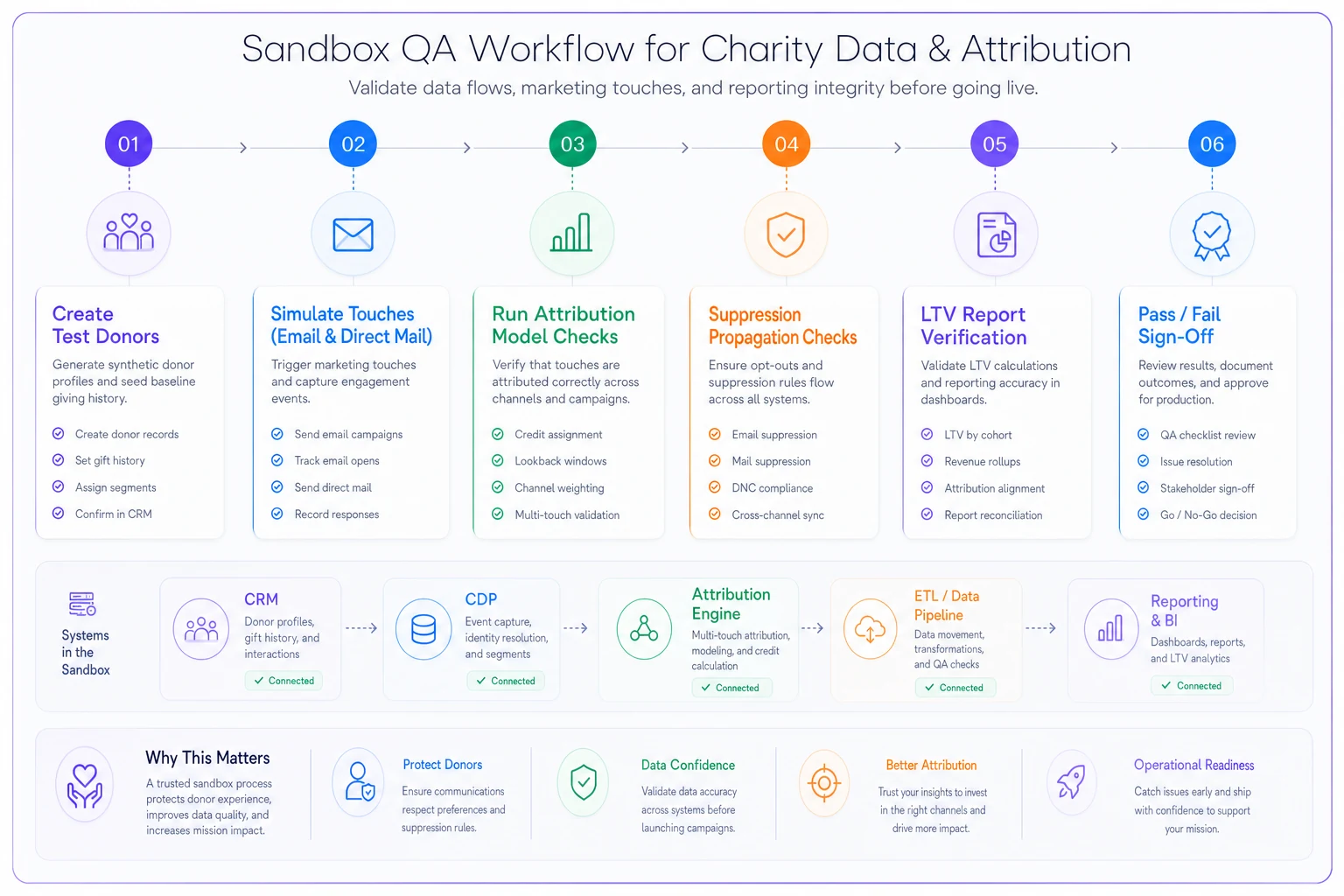
1. Attribution validation
-
Create a test donor. Simulate
email open → direct mail drop → gift 10 days later.
-
Confirm the gift credits direct mail under a 90-day last-touch model.
-
Switch to a 7-day email window. Confirm the email now gets no credit (outside window).
-
Verify no double-counting when the donor has multiple opens of the same email.
2. Suppression validation
-
Opt a test donor out of email via the public preference center.
-
Confirm suppression propagates to the CDP and execution tool within the stated SLA.
-
Build and send a test campaign. Confirm the opted-out donor receives nothing.
-
Pull the audit log. Confirm the opt-out has a reason code and timestamp.
3. LTV validation
-
Load a test donor with a known gift history (say, five gifts totaling a specific net figure).
-
Run the LTV report. Confirm it matches your hand-calculated net total exactly.
-
Confirm the cohort report places the donor in the correct acquisition month and channel.
-
Change one gift from gross-to-net handling and confirm the number moves as expected.
If any of these three fail, you don't have a reporting feature — you have a reporting promise. Don't sign off.
RFP question set + scoring rubric
Score each vendor 0–3 per question (0 = can't do it, 1 = custom/services only, 2 = configurable, 3 = out of the box). Weight attribution, suppression, and LTV heaviest.
Attribution
-
Can you show per-campaign attribution windows configured differently by channel?
-
Can I view one gift under multiple attribution models simultaneously?
-
How do you deduplicate repeated touches?
Suppression / consent
-
Is suppression enforced at send time or list-build time?
-
What is your consent propagation SLA across channels?
-
Show me the audit trail for a single opt-out.
LTV
-
Is LTV computed on gross or net, and is that configurable?
-
Can you produce cohort LTV by acquisition channel without services work?
-
Do you offer predictive LTV, and can you explain a score's drivers?
Integration / ops
-
Which connectors are pre-built vs custom?
-
What webhooks exist for gift, refund, and opt-out events?
-
What are your rate limits and uptime SLAs?
A vendor that scores high on integration but can't demo suppression at send time is a vendor whose compliance gaps become your compliance gaps.
Where this is worth the effort — and where it isn't
This full module map makes sense when you're running multi-channel annual giving at real volume — several campaigns a year across mail, email, and events, with recurring donors you need to retain. At that scale, misattribution and suppression gaps cost you real money and real trust.
This is overkill when you're a small team running two appeals a year through one platform. You don't need a separate CDP and attribution engine; you need a CRM with clean campaign codes and consent flags, and a disciplined spreadsheet for LTV. Buying eight modules to run a $200k annual program is how teams end up with tools nobody has time to operate.
Who should slow down before buying: any team that can't yet articulate its three core requirements in a sentence each. If you can't say what attribution rule you want, no engine will save you — it'll just automate your confusion faster.
A realistic scenario
A regional health nonprofit running roughly four annual appeals had a CRM, a separate email tool, and a processor that didn't pass campaign metadata. Attribution was a monthly spreadsheet reconciliation that took one staffer about two days. Suppression lived in two systems, and opt-outs synced overnight — meaning an opted-out donor could still get a morning email.
They scored three vendors against a rubric like the one above. The flashiest demo scored lowest on suppression (list-build only) and couldn't produce net-based LTV without a services engagement. They picked the less exciting option that passed all three sandbox QA checks on the first pass.
The measurable change wasn't dramatic revenue growth. The monthly attribution reconciliation dropped from two days to a scheduled report, opt-outs enforced within minutes instead of overnight, and LTV by channel became a standing dashboard the development director could pull before a board meeting instead of rebuilding it from scratch. Less heroics, fewer compliance near-misses, numbers people actually trusted.
That's the real payoff of buying by requirement: not a magic metric, but a stack where attribution, suppression, and LTV are features you own rather than promises you keep chasing.
Ready to elevate your nonprofit impact?
Join 2,000+ nonprofits using Almosly to boost fundraising efficiency, deepen donor relationships, and scale philanthropic impact.