


Most small nonprofits don't have a duplicate problem because they're careless. They have one because six different people entered data over four years, an online form fed the CRM without matching logic, and someone imported a spreadsheet from the gala without checking existing records first. The duplicates just accumulate quietly until a major donor gets three copies of the same appeal letter and mentions it at a board meeting.
If you're running donor data cleanup on a small CRM, the goal isn't perfection. It's getting the database into a state where duplicates stop breeding, and where the cleanup you do actually sticks. This post walks through the exact match/merge rules that work for common nonprofit fields, the automations you should turn off before you start, and a maintenance rhythm light enough that a two-person development team can realistically keep up with.
Why donor duplicates are worse than they look
A duplicate record isn't just a cosmetic annoyance. It fractures a donor's giving history across multiple profiles, which quietly breaks almost everything downstream.
Say a donor named Robert Kim gave $250 in 2021 under "Bob Kim," $500 in 2023 under "Robert Kim," and set up a $40/month recurring gift under "R. Kim" using a work email. On paper, you have three modest donors. In reality, you have one supporter who's given close to $1,500 plus recurring — someone who should probably be on a mid-level stewardship track. Your segmentation misses him, your major-gift officer never flags him, and your year-end tax summary is wrong on all three profiles.
Multiply that across a few hundred duplicates and the damage compounds:
-
Giving totals understate your best supporters
-
Lapsed-donor reports flag people who actually gave last month under a different record
-
Mail merges send the same appeal two or three times
-
Acknowledgment letters go out with incorrect year-to-date totals
-
Any LTV or attribution work sits on a broken foundation
The frustrating part is that most teams know they have duplicates. What they lack is a prioritized way to attack them without accidentally merging two people who happen to share a name.
Start by turning off what's making it worse
Before you merge a single record, stop the inflow. Cleaning duplicates while your intake systems keep generating new ones is like bailing a boat without patching the hole. In practice, the biggest duplicate generators are:
Stop missing fundraising opportunities.
Almosly helps you plan, track, and optimize every campaign with ease.
- Centralized donor and volunteer management
- Automated engagement workflows
- Impact and fundraising analytics
No credit card required
-
Online donation forms that create a new contact on every submission instead of matching on email
-
Event or peer-to-peer platforms syncing attendees without dedupe logic
-
Spreadsheet imports run without a match-on-import step
-
Volunteer signup forms feeding a separate contact pipeline
-
Payment processor syncs that key off transaction ID rather than donor identity
A lot of CRMs have "auto-create contact" toggled on for form submissions, matching on nothing — or at best, exact email only. If Robert used a Gmail address in 2021 and a work address in 2023, exact-email matching guarantees a duplicate.
Before cleanup week, audit every source that writes to your CRM and answer one question for each: what field does this use to decide whether a contact already exists? If the answer is "nothing" or "exact email only," fix that before merging anything. Otherwise you'll clean 400 duplicates in March and have 120 new ones by June.
Match rules that actually work for nonprofit fields
The core of good cleanup is knowing when two records are confidently the same person versus when they only look similar. False merges are worse than duplicates — you can split duplicates later, but merging two different donors and losing whose money is whose creates a mess that can take weeks to untangle.
Here's a practical confidence framework for the fields most nonprofit CRMs actually store:
| Match signal | Confidence | Action |
|---|---|---|
| Exact email match + similar name | High | Auto-merge candidate |
| Exact phone + same last name | High | Auto-merge candidate |
| Same name + same mailing address | High | Auto-merge candidate |
| Same name + same city, different address | Medium | Manual review |
| Same last name + same email domain (work) | Medium | Manual review |
| Same name only (common name) | Low | Do not merge |
| Same name + different DOB or spouse | Low | Keep separate |
A few field-specific rules that save you from the common traps:
Names. Normalize before matching. "Bob" and "Robert," "Bill" and "William," "Liz" and "Elizabeth" won't match on exact string comparison, but they're obviously the same person when the email and address line up. Build a small nickname lookup, or at minimum flag name-mismatch/email-match pairs for a human to eyeball.
Keep a compact nickname lookup of the few dozen common variants you see so name normalization is quick and low-effort.
Emails. Treat email as strong but not absolute. Shared household emails are extremely common — spouses using one address, or a family foundation using an office inbox. Email match plus different last name should go to manual review, not auto-merge, because that's often two real people.
Addresses. Standardize formatting before comparing. "123 Main St Apt 4" and "123 Main Street #4" are the same place but won't match as strings. Address match combined with different names usually means a household, not a duplicate — and households should be linked, not merged.
Phone numbers. Strip formatting and compare digits only. A phone match with a matching last name is one of your most reliable signals, since people rarely share cell numbers.
The pattern worth internalizing: one strong field alone is rarely enough; two independent fields agreeing is usually plenty. Name-only matches are the trap that sinks most DIY cleanups.
The prioritized cleanup sequence
Don't try to clean everything at once. Prioritize by donor value and risk, so the records that matter most get fixed first and you never risk fatigue leaving your top supporters half-merged.
-
Pull a duplicate candidate list, sorted by lifetime giving (descending). Your highest-value potential duplicates get reviewed first, while you're fresh and careful.
-
Handle high-confidence matches on major/mid-level donors manually. For anyone who's given meaningful amounts, a human reviews every merge even if the match confidence is high. These are the records where a mistake is most costly.
-
Batch the high-confidence, low-value duplicates. Small one-time donors with exact email + name matches can be merged in bulk with less scrutiny.
-
Work the medium-confidence pile as a review queue. Same name + same city, work-email matches, and similar-but-not-identical addresses go here. Two people can clear a few hundred of these in a focused afternoon.
-
Leave low-confidence pairs alone. Same-name-only matches stay separate. Flag them if you want, but don't merge on a hunch.
-
When you do merge, preserve the richest data. Keep the record with the most complete giving history, the oldest creation date (for accurate donor tenure), and consolidate soft credits and recurring gifts carefully so no transaction is orphaned.
The single most important habit here: before merging, confirm which record owns the recurring gift and the payment token. Merge into the wrong direction and you can accidentally break an active monthly donation. That's how a cleanup project turns into a lapsed recurring donor you have to win back.
A quick real scenario
A regional literacy nonprofit running a small CRM had roughly 6,800 contacts and suspected "a lot" of duplicates but had never quantified it. When they pulled a proper candidate list, about 540 records matched on strong signals — close to 8% of the database.
The messy part wasn't the count. It was that around 30 of their top ~200 donors had giving history split across two or three records, which meant their year-end appeal segmentation had been quietly wrong for years. A donor who'd given about $2,100 cumulatively was sitting in the $250–$500 band on every individual profile and never got a personal ask.
They didn't attempt a full cleanup in one pass. Over about three weeks, working an hour or two at a time, they manually cleared the high-value duplicates first, batch-merged roughly 300 low-value exact matches, and left maybe 60 same-name-only pairs untouched. The visible result: their next appeal went out without the usual handful of "why did I get this twice?" replies, and three previously-hidden mid-level donors got moved onto a proper stewardship track. Nothing dramatic — just a database that finally told the truth about who its supporters were.
The weekly maintenance cadence
Cleanup is a project. Staying clean is a habit. Without a recurring rhythm, you'll be back where you started within a year. The good news is that ongoing maintenance is a fraction of the initial effort — but only if you actually do it consistently.
A workable weekly checklist for a small team:
-
Run the new-duplicate report filtered to records created in the last 7 days. Fresh duplicates are easier to resolve because the data is recent and you often remember the context.
-
Review any records flagged by form intake as "possible match" that need a human to confirm.
-
Spot-check imports from the past week — event lists, spreadsheet uploads, anything that bypassed normal entry.
-
Merge the obvious new duplicates immediately while the volume is still small.
-
Log anything ambiguous to a monthly review queue instead of guessing.
A simple visual of this weekly-to-monthly workflow can help teams follow the steps consistently.
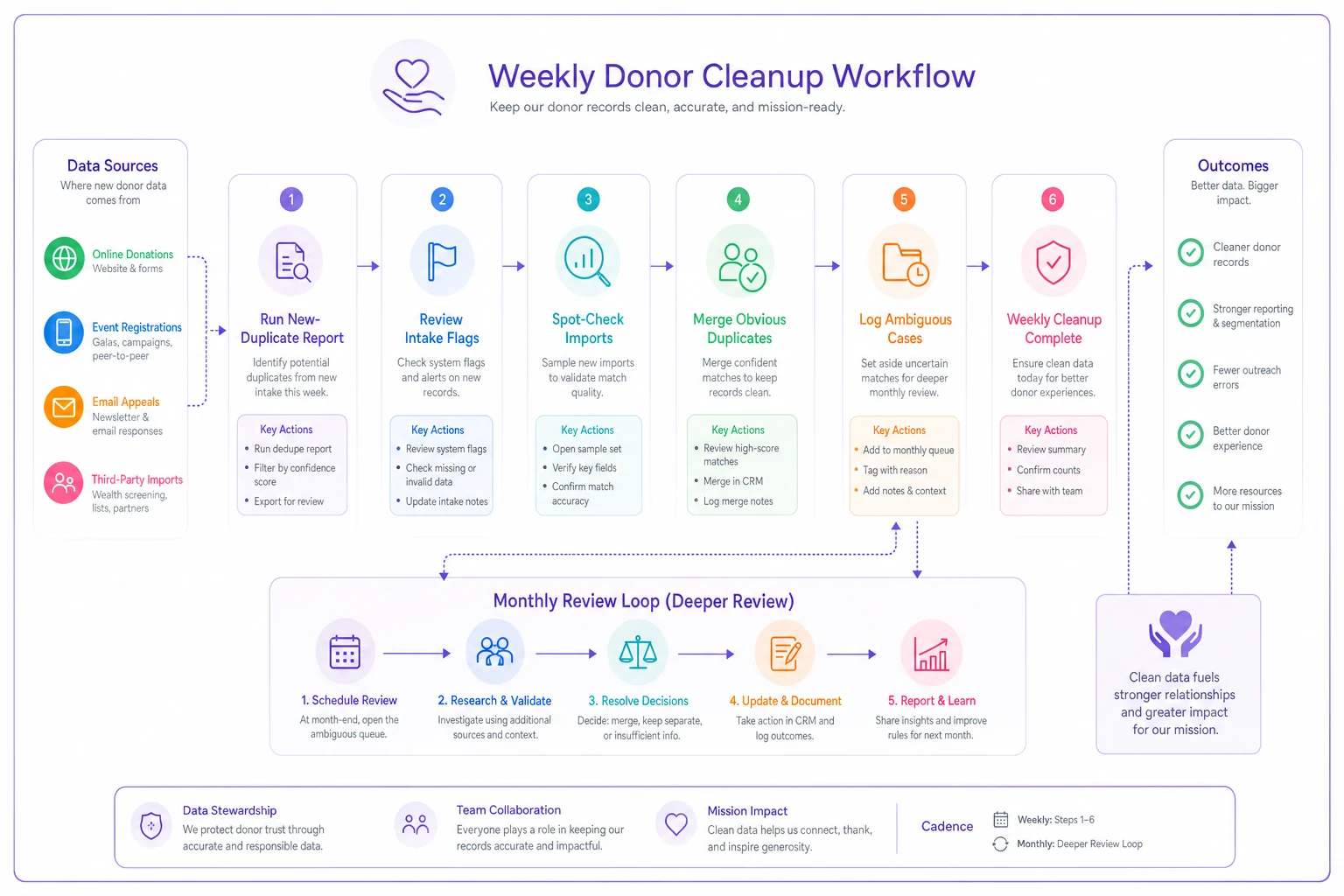
Then, monthly, do a slightly deeper pass: clear the ambiguous queue, re-check your form-matching settings, and pull a fresh full-database candidate count so you can watch the trend. If your weekly cadence is working, that monthly number should stay low and flat.
This is exactly the kind of repetitive, rules-based work where light automation earns its place. AI-assisted matching can pre-score candidate pairs by confidence and surface the ambiguous cases for a human to decide, so your team spends time on judgment calls instead of scrolling through obvious matches. The point isn't to hand merging over to software — it's to let the system do the tedious first pass so a person only reviews what genuinely needs a human eye. Used that way, an operational platform with AI-assisted dedupe turns a monthly slog into a fifteen-minute weekly check.
When to automate merges — and when not to
Not every duplicate should be resolved by a rule, and knowing where to draw the line keeps you out of trouble.
Auto-merge makes sense when the match is high-confidence (two independent strong fields agreeing), the donors are low-value, and there's no active recurring gift or payment token in play. Exact email plus exact name on a lapsed $25 one-time donor? Fine to batch.
Keep a human in the loop when the record belongs to a major or mid-level donor, when a recurring gift or pledge is attached, when the match is medium-confidence, or when soft credits and household relationships are involved. The cost of a bad merge on these records is far higher than the time saved.
Don't automate at all if your intake sources still create duplicates freely, or if your name and address data has never been standardized. Automating on top of messy inputs just produces confident-looking mistakes. Fix the inflow and normalize the fields first, then let automation handle the volume.
Bringing it together
Duplicate donor records aren't a sign of a sloppy team — they're the natural byproduct of multiple people, multiple intake channels, and years of accumulated data with no matching logic in between. The fix isn't a heroic one-time scrub. It's a prioritized cleanup that protects your highest-value records, a set of match rules conservative enough that you never merge two real people, and a weekly habit that catches new duplicates before they multiply.
Start by stopping the inflow. Clean your top donors by hand. Batch the easy matches, leave the risky ones alone, and put fifteen minutes on the calendar every week to stay ahead of it. Do that, and your segmentation, your acknowledgments, and your year-end reports will finally reflect who your donors actually are — which is the whole point of keeping the data in the first place.
Start by stopping the inflow. Clean your top donors by hand. Batch the easy matches, leave the risky ones alone, and put fifteen minutes on the calendar every week to stay ahead of it. Do that, and your segmentation, your acknowledgments, and your year-end reports will finally reflect who your donors actually are — which is the whole point of keeping the data in the first place.
Ready to elevate your nonprofit impact?
Join 2,000+ nonprofits using Almosly to boost fundraising efficiency, deepen donor relationships, and scale philanthropic impact.